04 生命周期
生命周期介绍
- 思考:什么时候可以发送 初始化渲染请求?(越早越好)什么时候可以开始 操作 dom?(至少 dom 得渲染出来)
- Vue 生命周期:就是一个 Vue 实例从 创建 到 销毁 的整个过程。
生命周期四个阶段
生命周期四个阶段:① 创建 ② 挂载 ③ 更新 ④ 销毁
创建阶段:创建响应式数据
挂载阶段:渲染模板
更新阶段:修改数据,更新视图
销毁阶段:销毁 Vue 实例
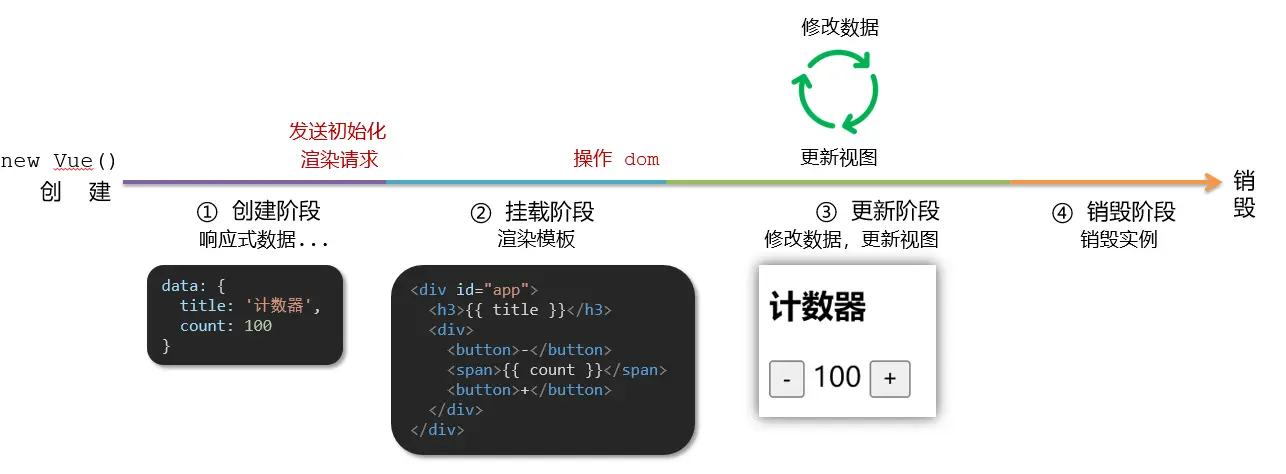
生命周期钩子
- Vue 生命周期过程中,会 自动运行一些函数,被称为【生命周期钩子】
- 目的:让开发者可以在【特定阶段】运行自己的代码
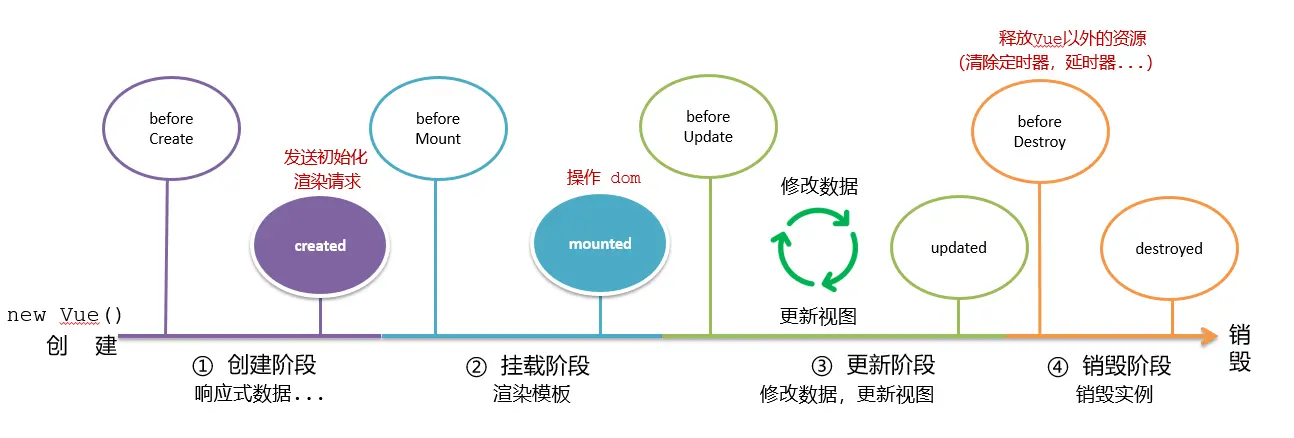
生命周期钩子
html
<div id="app">
  <h3>{{ title }}</h3>
  <div>
    <button @click="count--">-</button>
    <span>{{ count }}</span>
    <button @click="count++">+</button>
  </div>
</div>
<script src="./vue.js"></script>
<script>
  const app = new Vue({
    el: "#app",
    data: {
      count: 100,
      title: "计数器",
    },
    // 1. 创建阶段(准备数据)
    beforeCreate() {
      // 数据还未准备好,现在请求数据会返回 undefined
      console.log("beforeCreate 响应式数据准备好之前", this.count);
    },
    created() {
      // 可以开始发送初始化渲染的请求了,请求数据格式:`this.数据名 = 请求回来的数据`
      console.log("created 响应式数据准备好之后", this.count);
    },

    // 2. 挂载阶段(渲染模板 → 操作 dom)
    beforeMount() {
      // 还未渲染,此时操作 dom 会返回 {{ title }}
      console.log(
        "beforeMount 模板渲染之前",
        document.querySelector("h3").innerHTML
      );
    },
    mounted() {
      // 可以开始操作 dom 了,此时操作会返回值 `计数器`
      console.log(
        "mounted 模板渲染之后",
        document.querySelector("h3").innerHTML
      );
    },

    // 3. 更新阶段 (修改数据 → 更新视图)
    beforeUpdate() {
      // 页面点击后,数据修改,但是 dom 还未更新,此时请求拿到的是更新前的数据 100
      console.log(
        "beforeUpdate 数据修改了,视图还没更新",
        document.querySelector("span").innerHTML
      );
    },
    updated() {
      // 数据修改,dom 也更新了,此时请求拿到的是更新后的数据 101
      console.log(
        "updated 数据修改了,视图已经更新",
        document.querySelector("span").innerHTML
      );
    },

    // 4. 卸载阶段
    beforeDestroy() {
      // 执行 $destroy() 方法后,Vue 实例会被销毁,此时数据还在,dom 还在
      // 一般卸载前会将数据上传至服务器
      console.log("beforeDestroy, 卸载前");
      console.log("清除掉一些 Vue 以外的资源占用,定时器,延时器...");
    },
    destroyed() {
      // 此时数据已经被清除,dom 也被清除
      // 与 vue 相关的资源(事件绑定,事件监听等等)全部失效,已经渲染的数据不会消失
      console.log("destroyed,卸载后");
    },
  });

  // 2s 后卸载组件
  setTimeout(() => {
    app.$destroy();
  }, 2000);
</script>生命周期案例
新闻列表(created 应用)
案例预览

- created 数据准备好了,可以开始发送初始化渲染请求。
html
<div id="app">
  <ul>
    <li class="news">
      <div class="left">
        <div class="title">5G 商用在即,三大运营商营收持续下降</div>
        <div class="info">
          <span>新京报经济新闻</span>
          <span>2222-10-28 11:50:28</span>
        </div>
      </div>
      <div class="right">
        <img src="http://ajax-api.itheima.net/images/0.webp" alt="" referrerpolicy="no-referrer" />
      </div>
    </li>
    <li class="news">
      <div class="left">
        <div class="title">5G 商用在即,三大运营商营收持续下降</div>
        <div class="info">
          <span>新京报经济新闻</span>
          <span>2222-10-28 11:50:28</span>
        </div>
      </div>
      <div class="right">
        <img src="http://ajax-api.itheima.net/images/0.webp" alt="" referrerpolicy="no-referrer" />
      </div>
    </li>
  </ul>
</div>
<script src="./js/vue.js"></script>
<script src="./js/axios.js"></script>
<script>
  // 接口地址:http://hmajax.itheima.net/api/news
  // 请求方式:get
  const app = new Vue({
    el: "#app",
    data: {},
  });
</script>html
<div id="app">
  <ul>
    <li class="news" v-for="(item, index) in newsList" :key="item.id">
      <div class="left">
        <div class="title">{{ item.title }}</div>
        <div class="info">
          <span>{{ item.source }}</span>
          <span>{{ item.time }}</span>
        </div>
      </div>
      <div class="right">
        <img :src="item.img" alt="" referrerpolicy="no-referrer" />
      </div>
    </li>
  </ul>
</div>
<script src="./js/vue.js"></script>
<script src="./js/axios.js"></script>
<script>
  // 接口地址:http://hmajax.itheima.net/api/news
  // 请求方式:get
  const app = new Vue({
    el: "#app",
    data: {
      // 新闻列表数据
      newsList: [],
    },
    methods: {
      // 获取新闻列表数据
      async getNewsList() {
        try {
          const res = await axios.get("http://hmajax.itheima.net/api/news");
          console.log(res);
          // 将请求回来的新闻列表数据赋值给 data 中的 newsList
          this.newsList = res.data.data;
        } catch (err) {
          console.log(err);
        }
      },
    },
    // 在 created 钩子函数中调用获取新闻列表数据的方法
    created() {
      this.getNewsList();
    },
  });
</script>输入框自动聚焦(mounted 应用)
案例预览

- mounted 模板渲染完成,可以开始操作 DOM了。
html
<div class="container" id="app">
  <div class="search-container">
    <img src="./images/logo.png" alt="">
    <div class="search-box">
      <input type="text" v-model="words" id="inp">
      <button>搜索一下</button>
    </div>
  </div>
</div>

<script src="./js/vue.js"></script>
<script>
  const app = new Vue({
    el: '#app',
    data: {
      words: ''
    }
  })
</script>html
<div class="container" id="app">
  <div class="search-container">
    <img src="./images/logo.png" alt="" />
    <div class="search-box">
      <input type="text" v-model="words" id="inp" />
      <button>搜索一下</button>
    </div>
  </div>
</div>

<script src="./js/vue.js"></script>
<script>
  const app = new Vue({
    el: '#app',
    data: {
      words: '',
    },
    // 核心思路:
    // 1. 等 input 框渲染出来 mounted 钩子
    // 2. 让 input 框获取焦点 inp.focus()
    mounted() {
      // 获取 input 框
      const inp = document.querySelector('#inp');
      // 让 input 框获取焦点
      inp.focus();
    },
  });
</script>综合案例 小黑记账清单
案例预览

需求分析
- 基本渲染
- 添加功能
- 删除功能
- 饼图渲染
列表渲染 (请求)
- 立刻发送请求获取数据
created - 拿到数据,存到 data 的响应式数据中
- 结合数据,进行渲染
v-for - 消费统计 —> 计算属性
jsx
data: {
  // 帐单列表数据
  billList: [],
},
methods: {
  // 获取帐单列表数据
  async renderBillList() {
    try {
      const res = await axios.get(`https://applet-base-api-t.itheima.net/bill?creator=${creator}`);
      console.log(res);
      this.billList = res.data.data;
    } catch (error) {
      console.log(error);
    }
  },
},
mounted() {
  this.renderBillList();
},
computed: {
  // 计算总金额
  totalPrice() {
    return this.billList.reduce((sum, item) => sum + item.price, 0);
  },
},

<!-- 使用 v-for 遍历 billList -->
<tr v-for="(item, index) in billList" :key="item.id">
  <td>{{index+1}}</td>
  <td>{{item.name}}</td>
  <td :class="{red: item.price > 500}">{{item.price.toFixed(2)}}</td>
  <td><a href="javascript:;">删除</a></td>
</tr>添加功能
- 收集表单数据
v-model,使用指令修饰符处理数据 - 给添加按钮注册点击事件,对输入的内容做非空判断,发送请求
- 请求成功后,对文本框内容进行清空
- 重新渲染列表
jsx
<input v-model.trim="billName" type="text" class="form-control" placeholder="消费名称" />
<input v-model.number="billPrice" type="text" class="form-control" placeholder="消费价格" />
<button @click="addBill" type="button" class="btn btn-primary">添加账单</button>

data: {
  ...
  // 消费名称
  billName: '',
  // 消费价格
  billPrice: '',
},
methods: {
  ...
  // 添加账单
  async addBill() {
    // 判断是否输入了消费名称
    if (!this.billName) return alert('请输入消费名称');
    // 判断是否输入了消费价格和是否为数字
    if (!this.billPrice || isNaN(this.billPrice)) return alert('请输入正确的消费价格');

    try {
      const res = await axios.post('https://applet-base-api-t.itheima.net/bill', {
        creator,
        name: this.billName,
        price: this.billPrice,
      });
      console.log(res);
      this.billName = '';
      this.billPrice = '';
      this.renderBillList();
    } catch (error) {
      console.log(error);
    }
  },
}删除功能
- 注册点击事件,获取当前行的 id
- 根据 id 发送删除请求
- 需要重新渲染
jsx
<td><a @click.prevent="delBill(item.id)" href="javascript:;">删除</a></td>

methods: {
  ...
  // 删除账单
  async delBill(id) {
    try {
      const res = await axios.delete(`https://applet-base-api-t.itheima.net/bill/${id}`);
      console.log(`删除账单:${id}`, res);
      this.renderBillList();
    } catch (error) {
      console.log(error);
    }
  },
},饼图渲染
ECharts 官网:Apache ECharts 使用教程:快速上手 - Apache ECharts 饼图示例:pie - Apache ECharts
- 初始化一个饼图
echarts.init(dom)在mounted钩子中渲染 - 根据数据试试更新饼图
echarts.setOptions({…})
jsx
mounted() {
  ...
  // 饼图渲染
  // 基于准备好的 dom,初始化 echarts 实例
  this.myChart = echarts.init(document.querySelector('#main'));
  // 指定图表的配置项和数据
  const option = {
    // 标题
    title: {
      text: '消费统计',
      subtext: '小黑记账清单',
    },
    // 提示框
    tooltip: {
      trigger: 'item', // 触发类型 item:数据项图形触发 | axis:坐标轴触发 | none:什么都不触发
      formatter: '{a} <br/>{b} : {c} ({d}%)', // 提示框浮层内容格式器
    },
    // 图例
    legend: {
      // orient: 'vertical', // 垂直排列
      // left: 'left',
      top: 'bottom'
    },
    series: [
      {
        name: '消费统计',
        type: 'pie', // 饼图
        radius: [50, 100], // 半径
        center: ['50%', '50%'], // 圆心位置
        // roseType: 'area', // 南丁格尔图
        itemStyle: { // 饼图样式
          borderRadius: 8 // 圆角
        },
        data: [
          // 数据动态渲染,在 methods 中的 renderBillList 方法中渲染(每次请求数据后渲染)
          // { value: 0, name: '餐饮' },
          // { value: 0, name: '交通' },
        ],
        emphasis: { // 高亮样式
          itemStyle: {
            shadowBlur: 10,
            shadowOffsetX: 0,
            shadowColor: 'rgba(0, 0, 0, 0.5)',
          },
        },
      },
    ],
  };
  // 使用刚指定的配置项和数据显示图表
  this.myChart.setOption(option);
},

methods: {
  ...
  // 饼图数据动态渲染
  this.myChart.setOption({
    series: [
      {
        data: this.billList.map(item => ({ value: item.price, name: item.name })),
      },
    ],
  });
},相关代码
html
<div id="app">
  <div class="contain">
    <!-- 左侧列表 -->
    <div class="list-box">
      <!-- 添加资产 -->
      <form class="my-form">
        <input type="text" class="form-control" placeholder="消费名称" />
        <input type="text" class="form-control" placeholder="消费价格" />
        <button type="button" class="btn btn-primary">添加账单</button>
      </form>

      <table class="table table-hover">
        <thead>
          <tr>
            <th>编号</th>
            <th>消费名称</th>
            <th>消费价格</th>
            <th>操作</th>
          </tr>
        </thead>
        <tbody>
          <tr>
            <td>1</td>
            <td>帽子</td>
            <td>99.00</td>
            <td><a href="javascript:;">删除</a></td>
          </tr>
          <tr>
            <td>2</td>
            <td>大衣</td>
            <td class="red">199.00</td>
            <td><a href="javascript:;">删除</a></td>
          </tr>
        </tbody>
        <tfoot>
          <tr>
            <td colspan="4">消费总计:298.00</td>
          </tr>
        </tfoot>
      </table>
    </div>

    <!-- 右侧图表 -->
    <div class="echarts-box" id="main"></div>
  </div>
</div>
<script src="./js/echarts.min.js"></script>
<script src="./js/vue.js"></script>
<script src="./js/axios.min.js"></script>
<script>
  /**
   * 接口文档地址:
   * https://www.apifox.cn/apidoc/shared-24459455-ebb1-4fdc-8df8-0aff8dc317a8/api-53371058
   *
   * 功能需求:
   * 1. 基本渲染
   * 2. 添加功能
   * 3. 删除功能
   * 4. 饼图渲染
   */
  const app = new Vue({
    el: '#app',
    data: {},
  });
</script>html
<div id="app">
  <div class="contain">
    <!-- 左侧列表 -->
    <div class="list-box">
      <!-- 添加资产 -->
      <form class="my-form">
        <input type="text" class="form-control" placeholder="消费名称" />
        <input type="text" class="form-control" placeholder="消费价格" />
        <button type="button" class="btn btn-primary">添加账单</button>
      </form>

      <table class="table table-hover">
        <thead>
          <tr>
            <th>编号</th>
            <th>消费名称</th>
            <th>消费价格</th>
            <th>操作</th>
          </tr>
        </thead>
        <tbody>
          <!-- 使用 v-for 遍历 billList -->
          <tr v-for="(item, index) in billList" :key="item.id">
            <td>{{index+1}}</td>
            <td>{{item.name}}</td>
            <td :class="{red: item.price > 500}">{{item.price.toFixed(2)}}</td>
            <td><a href="javascript:;">删除</a></td>
          </tr>
        </tbody>
        <tfoot>
          <tr>
            <td colspan="4">消费总计:{{totalPrice.toFixed(2)}} </td>
          </tr>
        </tfoot>
      </table>
    </div>

    <!-- 右侧图表 -->
    <div class="echarts-box" id="main"></div>
  </div>
</div>
<script src="./js/echarts.min.js"></script>
<script src="./js/vue.js"></script>
<script src="./js/axios.min.js"></script>
<script>
  const creator = 'Doraemon';
  const app = new Vue({
    el: '#app',
    data: {
      // 帐单列表数据
      billList: [],
    },
    methods: {
      // 获取帐单列表数据
      async renderBillList() {
        try {
          const res = await axios.get(`https://applet-base-api-t.itheima.net/bill?creator=${creator}`);
          console.log(res);
          this.billList = res.data.data;
        } catch (error) {
          console.log(error);
        }
      },
    },
    mounted() {
      this.renderBillList();
    },
    computed: {
      // 计算总金额
      totalPrice() {
        return this.billList.reduce((sum, item) => sum + item.price, 0);
      },
    },
  });
</script>html
<div id="app">
  <div class="contain">
    <!-- 左侧列表 -->
    <div class="list-box">
      <!-- 添加资产 -->
      <form class="my-form">
        <input v-model.trim="billName" type="text" class="form-control" placeholder="消费名称" />
        <input v-model.number="billPrice" type="text" class="form-control" placeholder="消费价格" />
        <button @click="addBill" type="button" class="btn btn-primary">添加账单</button>
      </form>

      <table class="table table-hover">
        <thead>
          <tr>
            <th>编号</th>
            <th>消费名称</th>
            <th>消费价格</th>
            <th>操作</th>
          </tr>
        </thead>
        <tbody>
          <!-- 使用 v-for 遍历 billList -->
          <tr v-for="(item, index) in billList" :key="item.id">
            <td>{{index+1}}</td>
            <td>{{item.name}}</td>
            <td :class="{red: item.price > 500}">{{item.price.toFixed(2)}}</td>
            <td><a href="javascript:;">删除</a></td>
          </tr>
        </tbody>
        <tfoot>
          <tr>
            <td colspan="4">消费总计:{{totalPrice.toFixed(2)}} </td>
          </tr>
        </tfoot>
      </table>
    </div>

    <!-- 右侧图表 -->
    <div class="echarts-box" id="main"></div>
  </div>
</div>
<script src="./js/echarts.min.js"></script>
<script src="./js/vue.js"></script>
<script src="./js/axios.min.js"></script>
<script>
  const creator = 'Doraemon';
  const app = new Vue({
    el: '#app',
    data: {
      // 帐单列表数据
      billList: [],
      // 消费名称
      billName: '',
      // 消费价格
      billPrice: '',
    },
    methods: {
      // 获取帐单列表数据
      async renderBillList() {
        try {
          const res = await axios.get(`https://applet-base-api-t.itheima.net/bill?creator=${creator}`);
          console.log(res);
          this.billList = res.data.data;
        } catch (error) {
          console.log(error);
        }
      },
      // 添加账单
      async addBill() {
        // 判断是否输入了消费名称
        if (!this.billName) return alert('请输入消费名称');
        // 判断是否输入了消费价格和是否为数字
        if (!this.billPrice || isNaN(this.billPrice)) return alert('请输入正确的消费价格');

        try {
          const res = await axios.post('https://applet-base-api-t.itheima.net/bill', {
            creator,
            name: this.billName,
            price: this.billPrice,
          });
          console.log(res);
          this.billName = '';
          this.billPrice = '';
          this.renderBillList();
        } catch (error) {
          console.log(error);
        }
      },
    },
    mounted() {
      this.renderBillList();
    },
    computed: {
      // 计算总金额
      totalPrice() {
        return this.billList.reduce((sum, item) => sum + item.price, 0);
      },
    },
  });
</script>html
<div id="app">
  <div class="contain">
    <!-- 左侧列表 -->
    <div class="list-box">
      <!-- 添加资产 -->
      <form class="my-form">
        <input v-model.trim="billName" type="text" class="form-control" placeholder="消费名称" />
        <input v-model.number="billPrice" type="text" class="form-control" placeholder="消费价格" />
        <button @click="addBill" type="button" class="btn btn-primary">添加账单</button>
      </form>

      <table class="table table-hover">
        <thead>
          <tr>
            <th>编号</th>
            <th>消费名称</th>
            <th>消费价格</th>
            <th>操作</th>
          </tr>
        </thead>
        <tbody>
          <!-- 使用 v-for 遍历 billList -->
          <tr v-for="(item, index) in billList" :key="item.id">
            <td>{{index+1}}</td>
            <td>{{item.name}}</td>
            <td :class="{red: item.price > 500}">{{item.price.toFixed(2)}}</td>
            <td><a @click.prevent="delBill(item.id)" href="javascript:;">删除</a></td>
          </tr>
        </tbody>
        <tfoot>
          <tr>
            <td colspan="4">消费总计:{{totalPrice.toFixed(2)}} </td>
          </tr>
        </tfoot>
      </table>
    </div>

    <!-- 右侧图表 -->
    <div class="echarts-box" id="main"></div>
  </div>
</div>
<script src="./js/echarts.min.js"></script>
<script src="./js/vue.js"></script>
<script src="./js/axios.min.js"></script>
<script>
  const creator = 'Doraemon';
  const app = new Vue({
    el: '#app',
    data: {
      // 帐单列表数据
      billList: [],
      // 消费名称
      billName: '',
      // 消费价格
      billPrice: '',
    },
    methods: {
      // 获取帐单列表数据
      async renderBillList() {
        try {
          const res = await axios.get(`https://applet-base-api-t.itheima.net/bill?creator=${creator}`);
          console.log(res);
          this.billList = res.data.data;
        } catch (error) {
          console.log(error);
        }
      },
      // 添加账单
      async addBill() {
        // 判断是否输入了消费名称
        if (!this.billName) return alert('请输入消费名称');
        // 判断是否输入了消费价格和是否为数字
        if (!this.billPrice || isNaN(this.billPrice)) return alert('请输入正确的消费价格');

        try {
          const res = await axios.post('https://applet-base-api-t.itheima.net/bill', {
            creator,
            name: this.billName,
            price: this.billPrice,
          });
          console.log(res);
          this.billName = '';
          this.billPrice = '';
          this.renderBillList();
        } catch (error) {
          console.log(error);
        }
      },
      // 删除账单
      async delBill(id) {
        try {
          const res = await axios.delete(`https://applet-base-api-t.itheima.net/bill/${id}`);
          console.log(`删除账单:${id}`, res);
          this.renderBillList();
        } catch (error) {
          console.log(error);
        }
      },
    },
    mounted() {
      this.renderBillList();
    },
    computed: {
      // 计算总金额
      totalPrice() {
        return this.billList.reduce((sum, item) => sum + item.price, 0);
      },
    },
  });
</script>html
<div id="app">
  <div class="contain">
    <!-- 左侧列表 -->
    <div class="list-box">
      <!-- 添加资产 -->
      <form class="my-form">
        <input v-model.trim="billName" type="text" class="form-control" placeholder="消费名称" />
        <input v-model.number="billPrice" type="text" class="form-control" placeholder="消费价格" />
        <button @click="addBill" type="button" class="btn btn-primary">添加账单</button>
      </form>

      <table class="table table-hover">
        <thead>
          <tr>
            <th>编号</th>
            <th>消费名称</th>
            <th>消费价格</th>
            <th>操作</th>
          </tr>
        </thead>
        <tbody>
          <!-- 使用 v-for 遍历 billList -->
          <tr v-for="(item, index) in billList" :key="item.id">
            <td>{{index+1}}</td>
            <td>{{item.name}}</td>
            <td :class="{red: item.price > 500}">{{item.price.toFixed(2)}}</td>
            <td><a @click.prevent="delBill(item.id)" href="javascript:;">删除</a></td>
          </tr>
        </tbody>
        <tfoot>
          <tr>
            <td colspan="4">消费总计:{{totalPrice.toFixed(2)}} </td>
          </tr>
        </tfoot>
      </table>
    </div>

    <!-- 右侧图表 -->
    <div class="echarts-box" id="main"></div>
  </div>
</div>
<script src="./js/echarts.min.js"></script>
<script src="./js/vue.js"></script>
<script src="./js/axios.min.js"></script>
<script>
  const creator = 'Doraemon';
  const app = new Vue({
    el: '#app',
    data: {
      // 帐单列表数据
      billList: [],
      // 消费名称
      billName: '',
      // 消费价格
      billPrice: '',
    },
    methods: {
      // 获取帐单列表数据
      async renderBillList() {
        try {
          const res = await axios.get(`https://applet-base-api-t.itheima.net/bill?creator=${creator}`);
          console.log(res);
          this.billList = res.data.data;
        } catch (error) {
          console.log(error);
        }

        // 饼图数据动态渲染
        this.myChart.setOption({
          series: [
            {
              data: this.billList.map(item => ({ value: item.price, name: item.name })),
            },
          ],
        });
      },
      // 添加账单
      async addBill() {
        // 判断是否输入了消费名称
        if (!this.billName) return alert('请输入消费名称');
        // 判断是否输入了消费价格和是否为数字
        if (!this.billPrice || isNaN(this.billPrice)) return alert('请输入正确的消费价格');

        try {
          const res = await axios.post('https://applet-base-api-t.itheima.net/bill', {
            creator,
            name: this.billName,
            price: this.billPrice,
          });
          console.log(res);
          this.billName = '';
          this.billPrice = '';
          this.renderBillList();
        } catch (error) {
          console.log(error);
        }
      },
      // 删除账单
      async delBill(id) {
        try {
          const res = await axios.delete(`https://applet-base-api-t.itheima.net/bill/${id}`);
          console.log(`删除账单:${id}`, res);
          this.renderBillList();
        } catch (error) {
          console.log(error);
        }
      },
    },
    mounted() {
      this.renderBillList();

      // 饼图渲染
      // 基于准备好的 dom,初始化 echarts 实例
      this.myChart = echarts.init(document.querySelector('#main'));
      // 指定图表的配置项和数据
      const option = {
        // 标题
        title: {
          text: '消费统计',
          subtext: '小黑记账清单',
        },
        // 提示框
        tooltip: {
          trigger: 'item',
          formatter: '{a} <br/>{b} : {c} ({d}%)',
        },
        // 图例
        legend: {
          // orient: 'vertical', // 垂直排列
          // left: 'left',
          top: 'bottom'
        },
        series: [
          {
            name: '消费统计',
            type: 'pie', // 饼图
            radius: [50, 100], // 半径
            center: ['50%', '50%'], // 圆心位置
            // roseType: 'area', // 南丁格尔图
            itemStyle: { // 饼图样式
              borderRadius: 8 // 圆角
            },
            data: [
              // 数据动态渲染
              // { value: 0, name: '餐饮' },
              // { value: 0, name: '交通' },
            ],
            emphasis: { // 高亮样式
              itemStyle: {
                shadowBlur: 10,
                shadowOffsetX: 0,
                shadowColor: 'rgba(0, 0, 0, 0.5)',
              },
            },
          },
        ],
      };
      // 使用刚指定的配置项和数据显示图表
      this.myChart.setOption(option);
    },
    computed: {
      // 计算总金额
      totalPrice() {
        return this.billList.reduce((sum, item) => sum + item.price, 0);
      },
    },
  });
</script>案例总结
