10 路由 Vue Router
路由简介
思考
- 单页面应用程序,之所以开发效率高,性能好,用户体验好
- 最大的原因就是:页面按需更新
- 要按需更新,首先就需要明确:访问路径和 组件的对应关系!
- 访问路径 和 组件的对应关系如何确定呢? 路由
什么是路由
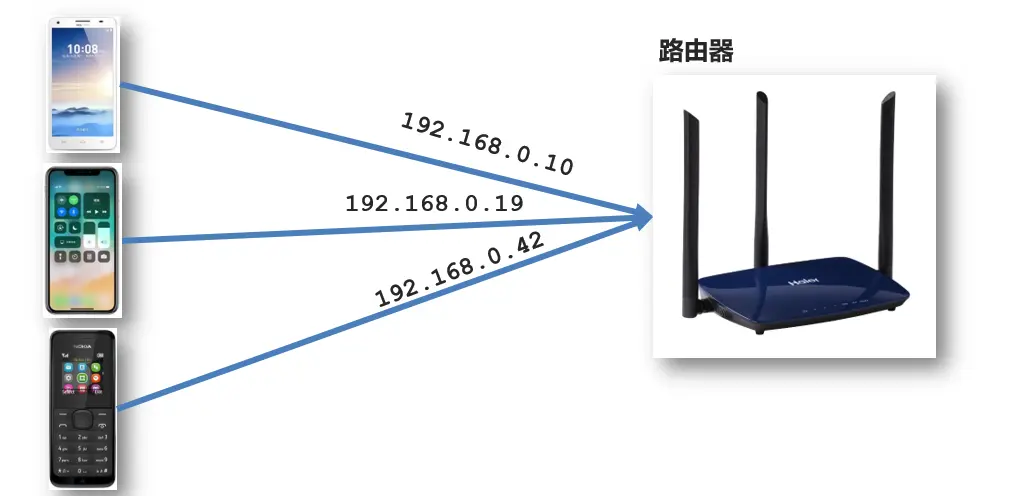
生活中的路由:设备和 ip 的映射关系
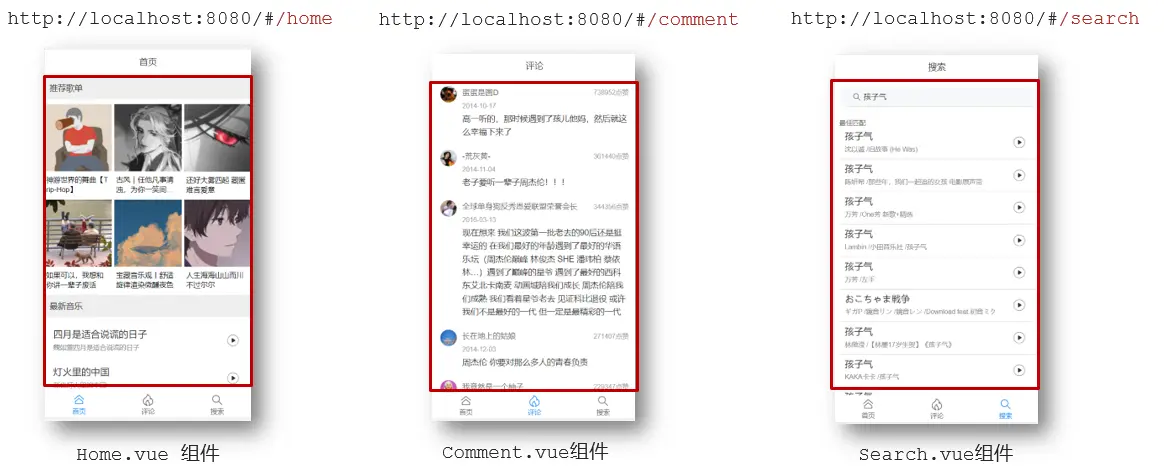
Vue 中的路由:路径和组件的映射关系
总结
什么是路由?
- 路由是一种映射关系
Vue 中的路由是什么?
- 路径 和 组件 的映射关系
- 根据路由就能知道不同路径的,应该匹配渲染哪个组件
Vue Router
- Vue Router 3 (for Vue 2)
- Vue Router 4 (for Vue 3)
Vue Router 介绍
- 目标:认识插件 VueRouter,掌握 VueRouter 的基本使用步骤
- 作用:修改地址栏路径时,切换显示匹配的组件
- 说明:Vue 官方的一个路由插件,是一个第三方包
- 官网:https://v3.router.vuejs.org/zh/
VueRouter 使用
下载 VueRouter 模块到当前工程,版本
3.6.5bashpnpm add vue-router@3.6.5main.js中使用js// 引入 VueRouter import VueRouter from 'vue-router' // 安装注册:VueRouter 插件初始化 Vue.use(VueRouter) // 创建路由对象 const router = new VueRouter() // 注入,将路由对象注入到 new Vue 实例中,建立关联 new Vue({ render: (h) => h(App), router: router, }).$mount('#app')当我们配置完以上 5 步之后 就可以看到浏览器地址栏中的路由 变成了 /#/的形式。表示项目的路由已经被 Vue Router 管理了

src目录下创建views目录,main.js中配置路由规则jsimport VueRouter from 'vue-router' import FindMusic from '@/views/FindMusic' import MyFriend from '@/views/MyFriend' import MyMusic from '@/views/MyMusic' const router = new VueRouter({ // routes 路由规则们 // route 一条路由规则 { path: 路径,component: 组件 } routes: [ { path: '/find', component: FindMusic }, { path: '/my', component: MyMusic }, { path: '/friend', component: MyFriend }, ], })App.vue中配置导航,配置路由出口 (路径匹配的组件显示的位置)vue<div> <div class="footer_wrap"> <a href="#/find">发现音乐</a> <a href="#/my">我的音乐</a> <a href="#/friend">朋友</a> </div> <div class="top"> <!-- 路由出口 → 匹配的组件所展示的位置 --> <router-view></router-view> </div> </div>
此时目录结构为
.
├── App.vue
├── main.js
└── views
├── FindMusic.vue
├── MyFriend.vue
└── MyMusic.vue代码示例
<script>
export default {}
</script>
<template>
<div>
  <div class="footer_wrap">
    <a href="#/find">发现音乐</a>
    <a href="#/my">我的音乐</a>
    <a href="#/friend">朋友</a>
  </div>
  <div class="top">
    <!-- 路由出口 → 匹配的组件所展示的位置 -->
    <router-view></router-view>
  </div>
</div>
</template>
<style>
body {
margin: 0;
padding: 0;
}
.footer_wrap {
position: relative;
left: 0;
top: 0;
display: flex;
width: 100%;
text-align: center;
background-color: #333;
color: #ccc;
}
.footer_wrap a {
flex: 1;
text-decoration: none;
padding: 20px 0;
line-height: 20px;
background-color: #333;
color: #ccc;
border: 1px solid black;
}
.footer_wrap a:hover {
background-color: #555;
}
</style>import Vue from 'vue'
import App from './App.vue'
import VueRouter from 'vue-router'
import FindMusic from '@/views/FindMusic'
import MyFriend from '@/views/MyFriend'
import MyMusic from '@/views/MyMusic'
Vue.use(VueRouter)
const router = new VueRouter({
// routes 路由规则们
// route 一条路由规则 { path: 路径,component: 组件 }
routes: [
{ path: '/find', component: FindMusic },
{ path: '/my', component: MyMusic },
{ path: '/friend', component: MyFriend },
],
})
Vue.config.productionTip = false
new Vue({
router,
render: (h) => h(App),
}).$mount('#app')<script>
export default {
name: 'FindMusic',
}
</script>
<template>
<div>
<p>发现音乐</p>
<p>发现音乐</p>
<p>发现音乐</p>
<p>发现音乐</p>
</div>
</template><script>
export default {
name: 'MyFriend',
}
</script>
<template>
<div>
<p>我的朋友</p>
<p>我的朋友</p>
<p>我的朋友</p>
<p>我的朋友</p>
</div>
</template><script>
export default {
name: 'MyMusic',
}
</script>
<template>
<div>
<p>我的音乐</p>
<p>我的音乐</p>
<p>我的音乐</p>
<p>我的音乐</p>
</div>
</template>总结
如何实现 路径改变,对应组件 切换?
- Vue 官方插件 VueRouter
VueRouter 的使用基本步骤?(5 + 2)
5 个基础步骤
下包
pnpm add vue-router@3.6.5引入
import VueRouter from 'vue-router'Vue.use 安装注册
Vue.use(VueRouter)创建路由对象
const router = new VueRouter()注入 Vue 实例
jsnew Vue({ render: (h) => h(App), router: router, }).$mount('#app')
2 个核心步骤
创建组件,配置规则 (路径组件的匹配关系 )
jsimport Find from './views/Find.vue' import My from './views/My.vue' import Friend from './views/Friend.vue' const router = new VueRouter({ // routes 路由规则们 // route 一条路由规则 { path: 路径,component: 组件 } routes: [ { path: '/find', component: FindMusic }, { path: '/my', component: MyMusic }, { path: '/friend', component: MyFriend }, ], })配导航,配置路由出口 router-view (组件展示的位置)
js<div class="footer wrap"> <a href="#/find">发现音乐</a> <a href="#/my">我的音乐</a> <a href="#/friend">朋友</a> </div> <div class="top"> <router-view></router-view> </div>
组件的存放目录问题
注意:
.vue文件 本质无区别
组件分类
.vue 文件分为 2 类,都是 .vue 文件(本质无区别)
- 页面组件(配置路由规则时使用的组件)
- 复用组件(多个组件中都使用到的组件)
存放目录
分类开来的目的就是为了 更易维护
src/views文件夹:页面组件 - 页面展示 - 配合路由用src/components文件夹:复用组件 - 展示数据 - 常用于复用
总结
组件分类有哪两类?分类的目的?
- 页面组件 和 复用组件,便于维护
不同分类的组件应该放在什么文件夹?作用分别是什么?
- 页面组件 -
views文件夹 => 配合路由,页面展示 - 复用组件 -
components文件夹 => 封装复用
- 页面组件 -
路由的封装抽离
- 问题:所有的路由配置都在
main.js中合适吗? - 目标:将路由模块抽离出来。=> 好处:拆分模块,利于维护
- 路径简写:脚手架环境下
@指代src目录,可以用于快速引入组件
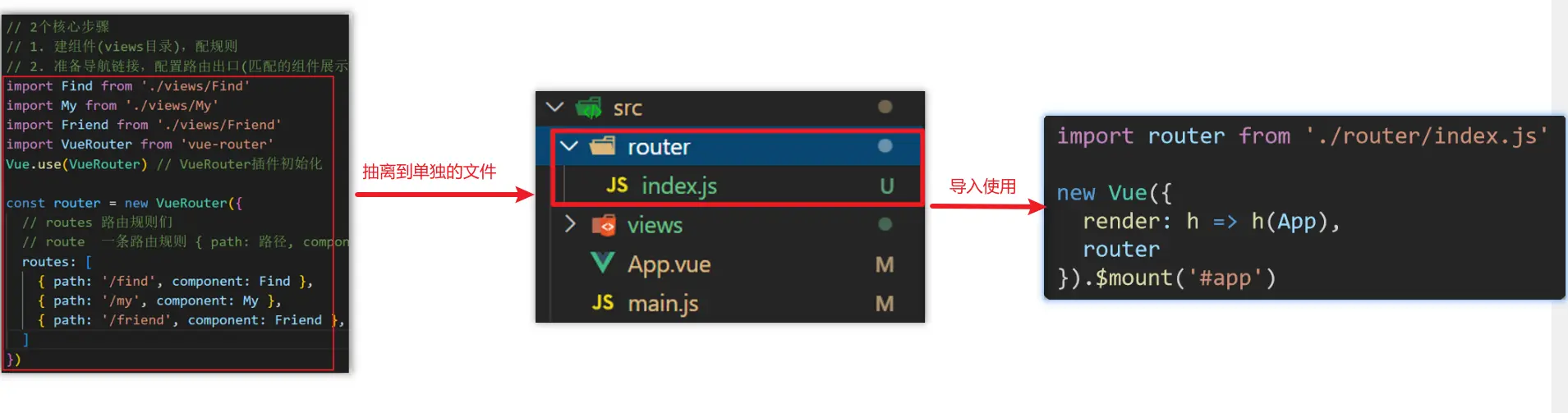
src 目录结构:
.
├── App.vue
├── main.js
├── router
│   └── index.js
└── views
    ├── FindMusic.vue
    ├── MyFriend.vue
└── MyMusic.vue<script>
export default {}
</script>
<template>
<div>
<div class="footer_wrap">
<a href="#/find">发现音乐</a>
<a href="#/my">我的音乐</a>
<a href="#/friend">朋友</a>
</div>
<div class="top">
<!-- 路由出口 → 匹配的组件所展示的位置 -->
<router-view></router-view>
</div>
</div>
</template>
<style>
body {
margin: 0;
padding: 0;
}
.footer_wrap {
position: relative;
left: 0;
top: 0;
display: flex;
width: 100%;
text-align: center;
background-color: #333;
color: #ccc;
}
.footer_wrap a {
flex: 1;
text-decoration: none;
padding: 20px 0;
line-height: 20px;
background-color: #333;
color: #ccc;
border: 1px solid black;
}
.footer_wrap a:hover {
background-color: #555;
}
</style>import Vue from 'vue'
import App from './App.vue'
import router from './router'
Vue.config.productionTip = false
new Vue({
router,
render: (h) => h(App),
}).$mount('#app')import Vue from 'vue'
import VueRouter from 'vue-router'
import FindMusic from '@/views/FindMusic'
import MyFriend from '@/views/MyFriend'
import MyMusic from '@/views/MyMusic'
Vue.use(VueRouter) // VueRouter 插件初始化
const routes = [
{ path: '/find', component: FindMusic },
{ path: '/my', component: MyMusic },
{ path: '/friend', component: MyFriend },
]
const router = new VueRouter({
routes,
})
export default routerVue 两种导航
| 声明式 | 编程式 |
|---|---|
<router-link :to="…"> | router.push(…) |
- 点击
<router-link :to="…">等同于调用router.push(…)
声明式导航
<!-- 字符串 -->
<router-link to="home">Home</router-link>
<!-- 渲染结果 -->
<a href="home">Home</a>

<!-- 使用 v-bind 的 JS 表达式 -->
<router-link v-bind:to="'home'">Home</router-link>

<!-- 不写 v-bind 也可以,就像绑定别的属性一样 -->
<router-link :to="'home'">Home</router-link>

<!-- 同上 -->
<router-link :to="{ path: 'home' }">Home</router-link>

<!-- 命名的路由 -->
<router-link :to="{ name: 'user', params: { userId: 123 }}">User</router-link>

<!-- 带查询参数,下面的结果为 /register?plan=private -->
<router-link :to="{ path: 'register', query: { plan: 'private' }}">Register</router-link>导航链接 router-link
实现导航高亮效果:如果使用 a 标签进行跳转的话,需要给当前跳转的导航加样式,同时要移除上一个 a 标签的样式,太麻烦!!!
解决方案:vue-router 提供了一个全局组件
<router-link>(取代 a 标签)- 能跳转,配置 to 属性指定路径 (必须) 。本质还是 a 标签,to 无需 #
- 能高亮,默认就会提供高亮类名,可以直接设置高亮样式
<router-link> 组件支持用户在具有路由功能的应用中 (点击) 导航。通过 to 属性指定目标地址,默认渲染成带有正确链接的 <a> 标签,可以通过配置 tag 属性生成别的标签.。另外,当目标路由成功激活时,链接元素自动设置一个表示激活的 CSS 类名。
<router-link>比起写死的<a href="…">会好一些,理由如下:
- 无论是 HTML5 history 模式还是 hash 模式,它的表现行为一致,所以,当你要切换路由模式,或者在 IE9 降级使用 hash 模式,无须作任何变动。
- 在 HTML5 history 模式下,
router-link会守卫点击事件,让浏览器不再重新加载页面。- 当你在 HTML5 history 模式下使用
base选项之后,所有的to属性都不需要写 (基路径) 了。
语法
<!-- 字符串 -->
<router-link to="home">Home</router-link>
<!-- 渲染结果 -->
<a href="home">Home</a>to:表示目标路由的链接。当被点击后,内部会立刻把to的值传到router.push(),所以这个值可以是一个字符串或者是描述目标位置的对象。active-class:(默认值:"router-link-active")设置链接激活时使用的 CSS 类名。默认值可以通过路由的构造选项linkActiveClass来全局配置。exact-active-class:(默认值:"router-link-exact-active")配置当链接被精确匹配的时候应该激活的 class。注意默认值也是可以通过路由构造函数选项linkExactActiveClass进行全局配置的。
<div class="footer_wrap">
  <a href="#/find">发现音乐</a>
  <a href="#/my">我的音乐</a>
  <a href="#/friend">朋友</a>
</div>

<!-- 使用 router-link -->
<div class="footer_wrap">
  <router-link to="/find">发现音乐</router-link>
  <router-link to="/my">我的音乐</router-link>
  <router-link to="/friend">朋友</router-link>
</div>

<!-- 渲染结果 -->
<div class="footer_wrap">
  <a href="#/find" class="router-link-exact-active router-link-active" aria-current="page">发现音乐</a>
  <a href="#/my" class="">我的音乐</a>
  <a href="#/friend" class="">朋友</a>
</div><script>
export default {}
</script>
<template>
<div>
<div class="footer_wrap">
<router-link to="/find">发现音乐</router-link>
<router-link to="/my">我的音乐</router-link>
<router-link to="/friend">朋友</router-link>
</div>
<div class="top">
<!-- 路由出口 → 匹配的组件所展示的位置 -->
<router-view></router-view>
</div>
</div>
</template>
<style>
body {
margin: 0;
padding: 0;
}
.footer_wrap {
position: relative;
left: 0;
top: 0;
display: flex;
width: 100%;
text-align: center;
background-color: #333;
color: #ccc;
}
.footer_wrap a {
flex: 1;
text-decoration: none;
padding: 20px 0;
line-height: 20px;
background-color: #333;
color: #ccc;
border: 1px solid black;
}
.footer_wrap a:hover {
background-color: #555;
}
</style>import Vue from 'vue'
import App from './App.vue'
import router from './router'
Vue.config.productionTip = false
new Vue({
router,
render: (h) => h(App),
}).$mount('#app')设置高亮
- 使用
router-link跳转后,我们发现。当前点击的链接默认加了两个 class 的值router-link-exact-active和router-link-active - 我们可以给任意一个 class 属性添加高亮样式即可实现功能
总结
router-link是什么?- vue-router 提供的全局组件,用于替换 a 标签
router-link怎么用?<router-link to="/路径值"></router-link>- 必须传入
to属性,指定路由路径值
router-link的好处是什么?- 能跳转,能高亮 (自带激活时的类名)
精确匹配&模糊匹配
- 当我们使用
<router-link></router-link>跳转时,自动给当前导航加了两个高亮类名:router-link-exact-active和router-link-active
router-link-active
- 模糊匹配(用的多)
to="/my"可以匹配/my/my/a/my/b….- 只要是以
/my开头的路径 都可以和to="/my"匹配到
router-link-exact-active
- 精确匹配
to="/my"仅可以匹配/my
<script>
export default {}
</script>

<template>
  <div>
    <div class="footer_wrap">
      <router-link to="/find">发现音乐</router-link>
      <router-link to="/my">我的音乐</router-link>
      <router-link to="/friend">朋友</router-link>
    </div>
    <div class="top">
      <!-- 路由出口 → 匹配的组件所展示的位置 -->
      <router-view></router-view>
    </div>
  </div>
</template>

<style scoped>
body {
  margin: 0;
  padding: 0;
}
.footer_wrap {
  position: relative;
  left: 0;
  top: 0;
  display: flex;
  width: 100%;
  text-align: center;
  background-color: #333;
  color: #ccc;
}
.footer_wrap a {
  flex: 1;
  text-decoration: none;
  padding: 20px 0;
  line-height: 20px;
  background-color: #333;
  color: #ccc;
  border: 1px solid black;
}

/*
  router-link-active 模糊匹配 (更多)
  访问 /find 时都会触发,访问 /find/one 也会触发
*/
.footer_wrap a.router-link-active {
  color: red;
}

/*
  router-link-exact-active 精确匹配
  访问 /find 时才会触发,访问 /find/one 不会触发
*/
.footer_wrap a.router-link-exact-active {
  background-color: pink;
}

.footer_wrap a:hover {
  background-color: #555;
}
</style>import Vue from 'vue'
import App from './App.vue'
import router from './router'
Vue.config.productionTip = false
new Vue({
router,
render: (h) => h(App),
}).$mount('#app')总结
<router-link>会自动给当前导航添加两个类名,有什么区别呢?router-link-active模糊匹配 (用的多)router-link-exact-active精确匹配
自定义高亮类名
- router-link 的两个高亮类名 太长了,我们希望能定制怎么办
- 我们可以在创建路由对象时,通过路由构造函数选项
linkActiveClass和linkExactActiveClass进行全局配置。
语法
const router = new VueRouter({
  routes: [...],
  linkActiveClass: "类名 1", // eg: linkActiveClass: 'active',
  linkExactActiveClass: "类名 2" // eg: linkExactActiveClass: 'exact-active'
})import Vue from 'vue'
import VueRouter from 'vue-router'
import FindMusic from '@/views/FindMusic'
import MyFriend from '@/views/MyFriend'
import MyMusic from '@/views/MyMusic'
Vue.use(VueRouter)
const routes = [
{ path: '/find', component: FindMusic },
{ path: '/my', component: MyMusic },
{ path: '/friend', component: MyFriend },
]
const router = new VueRouter({
routes,
// 自定义高亮类名
linkActiveClass: 'active', // 模糊匹配,默认值:router-link-active
linkExactActiveClass: 'exact-active', // 精确匹配,默认值:router-link-exact-active
})
export default router<script>
export default {}
</script>
<template>
<div>
<div class="footer_wrap">
<router-link to="/find">发现音乐</router-link>
<router-link to="/my">我的音乐</router-link>
<router-link to="/friend">朋友</router-link>
</div>
<div class="top">
<!-- 路由出口 → 匹配的组件所展示的位置 -->
<router-view></router-view>
</div>
</div>
</template>
<style scoped>
body {
margin: 0;
padding: 0;
}
.footer_wrap {
position: relative;
left: 0;
top: 0;
display: flex;
width: 100%;
text-align: center;
background-color: #333;
color: #ccc;
}
.footer_wrap a {
flex: 1;
text-decoration: none;
padding: 20px 0;
line-height: 20px;
background-color: #333;
color: #ccc;
border: 1px solid black;
}
/*
active 自定义模糊匹配类名 (更多)
访问 /find 时都会触发,访问 /find/one 也会触发
*/
.footer_wrap a.active {
color: red;
}
/*
exact-active 自定义精确匹配类名
访问 /find 时才会触发,访问 /find/one 不会触发
*/
.footer_wrap a.exact-active {
background-color: pink;
}
.footer_wrap a:hover {
background-color: #555;
}
</style>总结
如何自定义 router-link 的两个高亮类名
linkActiveClass模糊匹配 类名自定义linkExactActiveClass精确匹配 类名自定义
声明式导航传参
目标:在跳转路由时,进行传参
比如:现在我们在搜索页点击了热门搜索链接,跳转到详情页,需要把点击的内容带到详情页,改怎么办呢?
跳转传参:我们可以通过两种方式,在跳转的时候把所需要的参数传到其他页面中
- 查询参数传参
- 动态路由传参
查询参数传参
如何传参?
<router-link to="/path?参数名=参数值"></router-link>如何接受参数
js<p>搜索关键字:{{ $route.query.参数名 }}</p> created () { // 通过 this.$route.query.参数名 获取查询参数传递的参数 console.log(this.$route.query.参数名) }
import Vue from 'vue'
import VueRouter from 'vue-router'

import Home from '@/views/Home'
import Search from '@/views/Search'

Vue.use(VueRouter) // VueRouter 插件初始化

// 创建了一个路由对象
const router = new VueRouter({
  routes: [
    { path: '/home', component: Home },
    { path: '/search', component: Search },
  ],
})

export default router<template>
<div class="home">
<div class="logo-box"></div>
<div class="search-box">
<input type="text" />
<button>搜索一下</button>
</div>
<div class="hot-link">
热门搜索:
<!-- 查询参数传参 -->
<router-link to="/search?word=黑马程序员">黑马程序员</router-link>
<router-link to="/search?word=前端培训">前端培训</router-link>
<router-link to="/search?word=如何成为前端大牛">如何成为前端大牛</router-link>
</div>
</div>
</template>
<script>
export default {
name: 'FindMusic',
}
</script>
<style>
.logo-box {
height: 150px;
background: url('@/assets/logo.jpeg') no-repeat center;
}
.search-box {
display: flex;
justify-content: center;
}
.search-box input {
width: 400px;
height: 30px;
line-height: 30px;
border: 2px solid #c4c7ce;
border-radius: 4px 0 0 4px;
outline: none;
}
.search-box input:focus {
border: 2px solid #ad2a26;
}
.search-box button {
width: 100px;
height: 36px;
border: none;
background-color: #ad2a26;
color: #fff;
position: relative;
left: -2px;
border-radius: 0 4px 4px 0;
}
.hot-link {
width: 508px;
height: 60px;
line-height: 60px;
margin: 0 auto;
}
.hot-link a {
margin: 0 5px;
}
</style><template>
<div class="search">
<p>搜索关键字:{{ $route.query.word }}</p>
<p>搜索结果:</p>
<ul>
<li>.............</li>
<li>.............</li>
<li>.............</li>
<li>.............</li>
</ul>
</div>
</template>
<script>
export default {
name: 'MyFriend',
created () {
// 通过 this.$route.query.word 查询参数传参
console.log(this.$route.query.word)
},
}
</script>
<style>
.search {
width: 400px;
height: 240px;
padding: 0 20px;
margin: 0 auto;
border: 2px solid #c4c7ce;
border-radius: 5px;
}
</style>动态路由传参
配置动态路由:动态路由后面的参数可以随便起名,但要有语义
jsconst router = new VueRouter({ routes: [ ..., { path: '/search/:words', component: Search } ] })配置导航链接:
to="/path/参数值"对应页面组件接受参数:
$route.params.参数名,params后面的参数名要和动态路由配置的参数保持一致
import Vue from 'vue'
import VueRouter from 'vue-router'

import Home from '@/views/Home'
import Search from '@/views/Search'

Vue.use(VueRouter) // VueRouter 插件初始化

// 创建了一个路由对象
const router = new VueRouter({
  routes: [
    { path: '/home', component: Home },
    // 动态路由传参
    { path: '/search/:word', component: Search },
  ],
})

export default router<template>
<div class="home">
<div class="logo-box"></div>
<div class="search-box">
<input type="text" />
<button>搜索一下</button>
</div>
<div class="hot-link">
热门搜索:
<!-- 动态路由传参:配置导航链接 -->
<router-link to="/search/黑马程序员">黑马程序员</router-link>
<router-link to="/search/前端培训">前端培训</router-link>
<router-link to="/search/如何成为前端大牛">如何成为前端大牛</router-link>
</div>
</div>
</template>
<script>
export default {
name: 'FindMusic',
}
</script>
<style>
.logo-box {
height: 150px;
background: url('@/assets/logo.jpeg') no-repeat center;
}
.search-box {
display: flex;
justify-content: center;
}
.search-box input {
width: 400px;
height: 30px;
line-height: 30px;
border: 2px solid #c4c7ce;
border-radius: 4px 0 0 4px;
outline: none;
}
.search-box input:focus {
border: 2px solid #ad2a26;
}
.search-box button {
width: 100px;
height: 36px;
border: none;
background-color: #ad2a26;
color: #fff;
position: relative;
left: -2px;
border-radius: 0 4px 4px 0;
}
.hot-link {
width: 508px;
height: 60px;
line-height: 60px;
margin: 0 auto;
}
.hot-link a {
margin: 0 5px;
}
</style><template>
<div class="search">
<p>搜索关键字:{{ $route.params.word }}</p>
<p>搜索结果:</p>
<ul>
<li>.............</li>
<li>.............</li>
<li>.............</li>
<li>.............</li>
</ul>
</div>
</template>
<script>
export default {
name: 'MyFriend',
created () {
// 通过 this.$route.params.word 获取动态路由传递的参数
console.log(this.$route.params.word)
},
}
</script>
<style>
.search {
width: 400px;
height: 240px;
padding: 0 20px;
margin: 0 auto;
border: 2px solid #c4c7ce;
border-radius: 5px;
}
</style>查询参数传参 VS 动态路由传参
查询参数传参 (比较适合传多个参数)
- 跳转:
to="/path?参数名=值&参数名2=值" - 获取:
$route.query.参数名
- 跳转:
动态路由传参 (优雅简洁,传单个参数比较方便)
- 配置动态路由:
path: "/path/:参数名" - 跳转:
to="/path/参数值" - 获取:
$route.params.参数名
注意
动态路由也可以传多个参数,但一般只传一个
- 配置动态路由:
动态路由参数可选符
- 问题:配了路由
path: "/search/:words"未匹配到组件,但是进入页面显示空白? - 原因:
/search/:words表示,必须要传参数。如果不传参数,也希望匹配,可以加个可选符?
const router = new VueRouter({
  routes: [
    ...,
    { path: '/search/:words?', component: Search }
  ],
})import Vue from 'vue'
import VueRouter from 'vue-router'
import Home from '@/views/Home'
import Search from '@/views/Search'
Vue.use(VueRouter) // VueRouter 插件初始化
// 创建了一个路由对象
const router = new VueRouter({
routes: [
{ path: '/home', component: Home },
// 动态路由传参。如果没有配置动态路由参数可选符,路由路径中缺少动态路由参数,会导致页面其它元素也不显示
{ path: '/search/:word?', component: Search },
],
})
export default router<template>
<div class="home">
<div class="logo-box"></div>
<div class="search-box">
<input type="text" />
<button>搜索一下</button>
</div>
<div class="hot-link">
热门搜索:
<!-- 动态路由传参:配置导航链接 -->
<router-link to="/search/黑马程序员">黑马程序员</router-link>
<router-link to="/search/前端培训">前端培训</router-link>
<router-link to="/search/">如何成为前端大牛</router-link> <!-- 缺少动态路由参数,如果没有配置动态路由参数可选符,会导致页面其它元素也不显示 -->
</div>
</div>
</template>
<script>
export default {
name: 'FindMusic',
}
</script>
<style>
.logo-box {
height: 150px;
background: url('@/assets/logo.jpeg') no-repeat center;
}
.search-box {
display: flex;
justify-content: center;
}
.search-box input {
width: 400px;
height: 30px;
line-height: 30px;
border: 2px solid #c4c7ce;
border-radius: 4px 0 0 4px;
outline: none;
}
.search-box input:focus {
border: 2px solid #ad2a26;
}
.search-box button {
width: 100px;
height: 36px;
border: none;
background-color: #ad2a26;
color: #fff;
position: relative;
left: -2px;
border-radius: 0 4px 4px 0;
}
.hot-link {
width: 508px;
height: 60px;
line-height: 60px;
margin: 0 auto;
}
.hot-link a {
margin: 0 5px;
}
</style><template>
<div class="search">
<p>搜索关键字:{{ $route.params.word }}</p>
<p>搜索结果:</p>
<ul>
<li>.............</li>
<li>.............</li>
<li>.............</li>
<li>.............</li>
</ul>
</div>
</template>
<script>
export default {
name: 'MyFriend',
created () {
// 通过 this.$route.params.word 获取动态路由传递的参数
console.log(this.$route.params.word)
},
}
</script>
<style>
.search {
width: 400px;
height: 240px;
padding: 0 20px;
margin: 0 auto;
border: 2px solid #c4c7ce;
border-radius: 5px;
}
</style>Vue 动态路由
重定向
- 问题:网页打开,url 默认是
/路径,未匹配到组件时,会出现空白 - 说明:重定向 → 匹配 path 后,强制跳转 path 路径 → 匹配
/后,强制跳转/home路径 - 语法:
{ path: 匹配路径, redirect: 重定向到的路径 },
// 从 /a 重定向到 /b
const router = new VueRouter({
  routes: [{ path: '/a', redirect: '/b' }],
})重定向和别名
import Vue from 'vue'
import VueRouter from 'vue-router'

import Home from '@/views/Home'
import Search from '@/views/Search'

Vue.use(VueRouter) // VueRouter 插件初始化

// 创建了一个路由对象
const router = new VueRouter({
  routes: [
    // 路由重定向:访问 / 重定向到 /home
    { path: '/', redirect: '/home' },
    { path: '/home', component: Home },
    { path: '/search/:word?', component: Search },
  ],
})

export default router通配符路由
- 常规参数只会匹配被
/分隔的 URL 片段中的字符。如果想匹配任意路径,我们可以使用通配符 (*)。 - 当使用通配符路由时,请确保路由的顺序是正确的,也就是说含有通配符的路由应该放在最后。
- 路由
{ path: '*' }通常用于客户端 404 错误。 - 作用:当路径找不到匹配时,给个提示页面
- 位置:404 的路由,虽然配置在任何一个位置都可以,但一般都配置在其他路由规则的最后面
import NotFound from '@/views/NotFound'

const router = new VueRouter({
  routes: [
    { path: '/', redirect: '/home' },
    { path: '/home', component: Home },
    { path: '/search/:words?', component: Search },
    { path: '*', component: NotFound }, // 通配符路由一般是最后一个
  ],
})import Vue from 'vue'
import VueRouter from 'vue-router'
import Home from '@/views/Home'
import Search from '@/views/Search'
import NotFound from '@/views/NotFound'
Vue.use(VueRouter) // VueRouter 插件初始化
// 创建了一个路由对象
const router = new VueRouter({
routes: [
{ path: '/', redirect: '/home' },
{ path: '/home', component: Home },
{ path: '/search/:word?', component: Search },
// 通配符路由:匹配所有路径
// 一般为了防止用户输入错误的路径,或者是用户输入的路径没有匹配到任何路由
// 我们可以配置一个通配符路由,当用户输入的路径没有匹配到任何路由时,就会匹配到通配符路由,从而显示一个 404 页面
{ path: '*', component: NotFound },
],
})
export default router<!-- 404 Page -->
<script>
export default {
name: 'NotFound',
}
</script>
<template>
<div class="not-found">
<h1>404</h1>
<h2>Page not found</h2>
<p>We're sorry, the page you requested could not be found. Please go back to the homepage</p>
<router-link to="/">Home</router-link>
</div>
</template>路由模式
hash路由 (默认)- 例如:
http://localhost:8080/#/home - 使用 URL 的 hash 来模拟一个完整的 URL,于是当 URL 改变时,页面不会重新加载。
- 例如:
history路由 (常用)- 例如:
http://localhost:8080/home(URL 就像正常的 url) - history 模式模式充分利用
history.pushStateAPI 来完成 URL 跳转而无须重新加载页面。 - 这种模式要玩好,还需要后台配置支持。因为我们的应用是个单页客户端应用,如果后台没有正确的配置,当用户在浏览器直接访问
http://oursite.com/user/id就会返回 404 - 后端配置:HTML5 History 模式 | Vue Router
- 例如:
const router = new VueRouter({
  mode: 'history',
  routes: [...]
})路由模式
import Vue from 'vue'
import VueRouter from 'vue-router'

import Home from '@/views/Home'
import Search from '@/views/Search'
import NotFound from '@/views/NotFound'

Vue.use(VueRouter) // VueRouter 插件初始化

// 创建了一个路由对象
const router = new VueRouter({
  // 通过 mode 配置路由模式,默认为 hash 模式 (带 # 号)
  // hash 模式:http://localhost:8080/#/home
  // history 模式:http://localhost:8080/home
  mode: 'history',
  routes: [
    { path: '/', redirect: '/home' },
    { path: '/home', component: Home },
    { path: '/search/:word?', component: Search },
    { path: '*', component: NotFound },
  ],
})

export default router编程式导航
// 字符串
router.push('home')

// 对象
router.push({ path: 'home' })

// 命名的路由
router.push({ name: 'user', params: { userId: '123' } })

// 带查询参数,变成 /register?plan=private
router.push({ path: 'register', query: { plan: 'private' } })path路径跳转(简易方便)name命名路由跳转 (适合path路径长的场景)
命名路由
有时候,通过一个名称来标识一个路由显得更方便一些,特别是在链接一个路由,或者是执行一些跳转的时候。
你可以在创建 Router 实例的时候,在
routes配置中给某个路由设置名称。jsconst router = new VueRouter({ routes: [ { path: '/user/:userId', name: 'user', component: User, }, ], })要链接到一个命名路由,可以给
router-link的to属性传一个对象html<router-link :to="{ name: 'user', params: { userId: 123 }}">User</router-link>这跟代码调用
router.push()是一回事jsrouter.push({ name: 'user', params: { userId: 123 } })这两种方式都会把路由导航到
/user/123路径。
完整示例
import Vue from 'vue'
import VueRouter from 'vue-router'

Vue.use(VueRouter)

const Home = { template: '<div>This is Home</div>' }
const Foo = { template: '<div>This is Foo</div>' }
const Bar = { template: '<div>This is Bar {{ $route.params.id }}</div>' }

const router = new VueRouter({
  mode: 'history',
  base: __dirname,
  routes: [
    { path: '/', name: 'home', component: Home },
    { path: '/foo', name: 'foo', component: Foo },
    { path: '/bar/:id', name: 'bar', component: Bar },
  ],
})

new Vue({
  router,
  template: `
    <div id="app">
      <h1>Named Routes</h1>
      <p>Current route name: {{ $route.name }}</p>
      <ul>
        <li><router-link :to="{ name: 'home' }">home</router-link></li>
        <li><router-link :to="{ name: 'foo' }">foo</router-link></li>
        <li><router-link :to="{ name: 'bar', params: { id: 123 }}">bar</router-link></li>
      </ul>
      <router-view class="view"></router-view>
    </div>
  `,
}).$mount('#app')命名路由
import Vue from 'vue'
import VueRouter from 'vue-router'

import Home from '@/views/Home'
import Search from '@/views/Search'
import NotFound from '@/views/NotFound'

Vue.use(VueRouter) // VueRouter 插件初始化

// 创建了一个路由对象
const router = new VueRouter({

  mode: 'history',
  routes: [
    { path: '/', redirect: '/home' },
    { name: 'home', path: '/home', component: Home },
    { name: 'search', path: '/search/:word?', component: Search },
    { path: '*', component: NotFound },
  ],
})

export default router基本跳转
path 路径跳转
- 特点:简易方便
- 语法
// 简单写法
this.$router.push('路由路径')

// 完整写法
this.$router.push({
  path: '路由路径',
})name 命名路由跳转
特点:适合 path 路径长的场景
语法
路由规则,必须配置
name配置项js{ name: '路由名', path: '/path/xxx', component: XXX },通过
name来进行跳转jsthis.$router.push({ name: '路由名', })
<template>
  <div id="app">
    <div class="link">
      <router-link to="/home">首页</router-link>
      <router-link to="/search">搜索页</router-link>
    </div>

    <router-view></router-view>
  </div>
</template>

<script>
export default {}
</script>

<style scoped>
.link {
  height: 50px;
  line-height: 50px;
  background-color: #495150;
  display: flex;
  margin: -8px -8px 0 -8px;
  margin-bottom: 50px;
}
.link a {
  display: block;
  text-decoration: none;
  background-color: #ad2a26;
  width: 100px;
  text-align: center;
  margin-right: 5px;
  color: #fff;
  border-radius: 5px;
}
</style>import Vue from 'vue'
import VueRouter from 'vue-router'
import MyHome from '@/views/Home'
import MySearch from '@/views/Search'
import NotFound from '@/views/NotFound'
Vue.use(VueRouter) // VueRouter 插件初始化
// 创建了一个路由对象
const router = new VueRouter({
mode: 'history',
routes: [
{ path: '/', redirect: '/home' },
{ name: 'home', path: '/home', component: MyHome },
{ name: 'search', path: '/search/:word?', component: MySearch },
{ path: '*', component: NotFound },
],
})
export default router总结
编程式导航有几种跳转方式?
通过路径跳转 (简易方便)
jsthis.$router.push('路由路径') // or this.$router.push({ path: '路由路径', })通过路由名字跳转 (适合路径名字长的场景)
js// 路由规则中必须配置 name 配置项 { name: '路由名', path: '/path/xxx', component: XXX }, // 通过 name 来进行跳转 this.$router.push({ name: '路由名' })
编程式导航传参
两种传参方式
- query 查询参数传参(
$route.query.参数名接收参数) - 动态路由传参(
$route.params.参数名接收参数)
- query 查询参数传参(
两种跳转方式(对于两种传参方式都支持)
- path 路径跳转
- name 命名路由跳转
查询参数传参
path 路径跳转
js// 简单写法 this.$router.push('/路径?参数名1=参数值1&参数2=参数值2') // 完整写法 this.$router.push({ path: '/路径', query: { 参数名 1: '参数值 1', 参数名 2: '参数值 2' } })name 命名路由跳转
jsthis.$router.push({ name: '路由名字', query: { 参数名1: '参数值 1', 参数名2: '参数值 2', }, })接受参数的方式:
$route.query.参数名
import Vue from 'vue'
import VueRouter from 'vue-router'
import MyHome from '@/views/Home'
import MySearch from '@/views/Search'
import NotFound from '@/views/NotFound'
Vue.use(VueRouter) // VueRouter 插件初始化
// 创建了一个路由对象
const router = new VueRouter({
mode: 'history',
routes: [
{ path: '/', redirect: '/home' },
{ name: 'home', path: '/home', component: MyHome },
{ name: 'search', path: '/search', component: MySearch },
{ path: '*', component: NotFound },
],
})
export default router<template>
<div class="home">
<div class="logo-box"></div>
<div class="search-box">
<!-- 查询参数传参 -->
<!-- 回车使用 path 路径跳转 -->
<!-- 点击搜索按钮使用 name 命名路由跳转 -->
<input type="text" @keyup.enter="handleSearchPath" ref="inp" v-model.trim="inpValue" />
<button @click="handleSearchName">搜索一下</button>
</div>
<div class="hot-link">
热门搜索:
<router-link to="/search?word=黑马程序员">黑马程序员</router-link>
<router-link to="/search?word=前端培训">前端培训</router-link>
<router-link to="/search?word=">如何成为前端大牛</router-link>
</div>
</div>
</template>
<script>
export default {
name: 'MyHome',
data () {
return {
inpValue: '',
}
},
methods: {
handleSearchPath () { // path 路径跳转
// this.$router.push(`/search?word=${this.inpValue}`) // 简单写法
this.$router.push({ // 完整写法
path: '/search',
query: {
word: this.inpValue,
},
})
},
handleSearchName () { // name 命名路由跳转
this.$router.push({
name: 'search', // 路由规则 (router/index.js) 中必须配置 name 配置项
query: {
word: this.inpValue,
},
})
},
},
}
</script>
<style>
.logo-box {
height: 150px;
background: url('@/assets/logo.jpeg') no-repeat center;
}
.search-box {
display: flex;
justify-content: center;
}
.search-box input {
width: 400px;
height: 30px;
line-height: 30px;
border: 2px solid #c4c7ce;
border-radius: 4px 0 0 4px;
outline: none;
}
.search-box input:focus {
border: 2px solid #ad2a26;
}
.search-box button {
width: 100px;
height: 36px;
border: none;
background-color: #ad2a26;
color: #fff;
position: relative;
left: -2px;
border-radius: 0 4px 4px 0;
}
.hot-link {
width: 508px;
height: 60px;
line-height: 60px;
margin: 0 auto;
}
.hot-link a {
margin: 0 5px;
}
</style><template>
<div class="search">
<p>搜索关键字:{{ $route.query.word }}</p>
<p>搜索结果:</p>
<ul>
<li>.............</li>
<li>.............</li>
<li>.............</li>
<li>.............</li>
</ul>
</div>
</template>
<script>
export default {
name: 'MySearch',
created () {
// 通过 this.$route.query.word 获取查询字符串传递的参数
console.log(this.$route.query.word)
},
}
</script>
<style>
.search {
width: 400px;
height: 240px;
padding: 0 20px;
margin: 0 auto;
border: 2px solid #c4c7ce;
border-radius: 5px;
}
</style>动态路由传参
path 路径跳转
js//简单写法 this.$router.push('/路径/参数值') //完整写法 this.$router.push({ path: '/路径/参数值', })name 命名路由跳转
jsthis.$router.push({ name: '路由名字', params: { 参数名:'参数值', }, })接受参数的方式:
$route.query.参数名
import Vue from 'vue'
import VueRouter from 'vue-router'

import MyHome from '@/views/Home'
import MySearch from '@/views/Search'
import NotFound from '@/views/NotFound'

Vue.use(VueRouter) // VueRouter 插件初始化

// 创建了一个路由对象
const router = new VueRouter({

  mode: 'history',
  routes: [
    { path: '/', redirect: '/home' },
    { name: 'home', path: '/home', component: MyHome },
    { name: 'search', path: '/search/:word?', component: MySearch },
    { path: '*', component: NotFound },
  ],
})

export default router<template>
<div class="home">
<div class="logo-box"></div>
<div class="search-box">
<!-- 动态路由传参 -->
<!-- 回车使用 path 路径跳转 -->
<!-- 点击搜索按钮使用 name 命名路由跳转 -->
<input type="text" @keyup.enter="handleSearchPath" ref="inp" v-model.trim="inpValue" />
<button @click="handleSearchName">搜索一下</button>
</div>
<div class="hot-link">
热门搜索:
<router-link to="/search/黑马程序员">黑马程序员</router-link>
<router-link to="/search/前端培训">前端培训</router-link>
<router-link to="/search/">如何成为前端大牛</router-link>
</div>
</div>
</template>
<script>
export default {
name: 'MyHome',
data () {
return {
inpValue: '',
}
},
methods: {
handleSearchPath () { // path 路径跳转
// this.$router.push(`/search/${this.inpValue}`) // 简单写法
this.$router.push({ // 完整写法
path: `/search/${this.inpValue}`,
})
},
handleSearchName () { // name 命名路由跳转
this.$router.push({
name: 'search', // 路由规则 (router/index.js) 中必须配置 name 配置项
params: {
word: this.inpValue,
},
})
},
},
}
</script>
<style>
.logo-box {
height: 150px;
background: url('@/assets/logo.jpeg') no-repeat center;
}
.search-box {
display: flex;
justify-content: center;
}
.search-box input {
width: 400px;
height: 30px;
line-height: 30px;
border: 2px solid #c4c7ce;
border-radius: 4px 0 0 4px;
outline: none;
}
.search-box input:focus {
border: 2px solid #ad2a26;
}
.search-box button {
width: 100px;
height: 36px;
border: none;
background-color: #ad2a26;
color: #fff;
position: relative;
left: -2px;
border-radius: 0 4px 4px 0;
}
.hot-link {
width: 508px;
height: 60px;
line-height: 60px;
margin: 0 auto;
}
.hot-link a {
margin: 0 5px;
}
</style><template>
<div class="search">
<p>搜索关键字:{{ $route.params.word }}</p>
<p>搜索结果:</p>
<ul>
<li>.............</li>
<li>.............</li>
<li>.............</li>
<li>.............</li>
</ul>
</div>
</template>
<script>
export default {
name: 'MySearch',
created () {
// 通过 this.$route.params.word 获取动态路由传递的参数
console.log(this.$route.params.word)
},
}
</script>
<style>
.search {
width: 400px;
height: 240px;
padding: 0 20px;
margin: 0 auto;
border: 2px solid #c4c7ce;
border-radius: 5px;
}
</style>总结
编程式导航,如何跳转传参?
path 路径跳转
query 传参
jsthis.$router.push('/路径?参数名 1=参数值 1&参数 2=参数值 2') this.$router.push({ path: '/路径', query: { 参数名 1: '参数值 1', 参数名 2: '参数值 2' } })动态路由传参
jsthis.$router.push('/路径/参数值') this.$router.push({ path: '/路径/参数值', })
name 命名路由跳转
query 传参
jsthis.$router.push({ name: '路由名字', query: { 参数名 1: '参数值 1', 参数名 2: '参数值 2' } })动态路由传参 (需要配动态路由)
jsthis.$router.push({ name: '路由名字', params: { 参数名:'参数值', } })
案例 面经基础版
- 主要的功能页面有两个,一个是列表页,一个是详情页,并且在列表页点击时可以跳转到详情页
- 底部导航可以来回切换,并且切换时,只有上面的主题内容在动态渲染
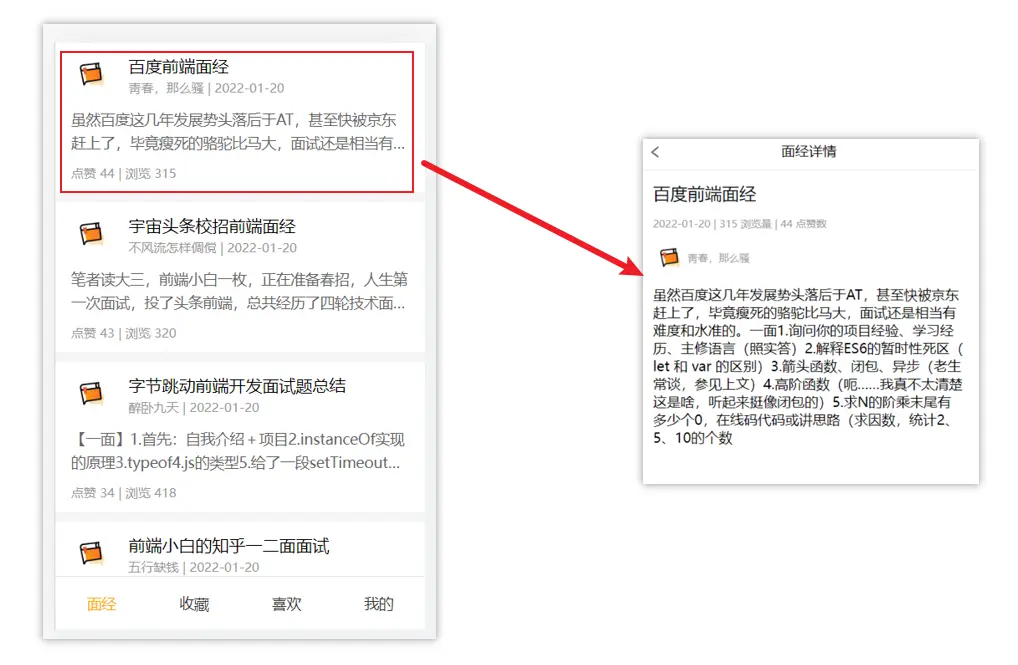
思路分析
配置路由
- 首页和面经详情页,两个一级路由
- 首页内嵌套 4 个可切换的页面(嵌套二级路由)
实现功能
- 首页请求渲染
- 跳转传参 到 详情页,详情页动态渲染
- 组件缓存,性能优化
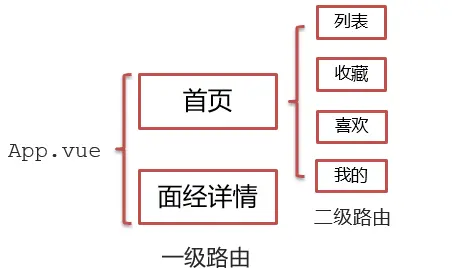
一级路由配置
- 把文档中准备的素材拷贝到项目中
- 针对
router/index.js文件 进行一级路由配置
小节代码
// router/index.js
import Vue from 'vue'
import VueRouter from 'vue-router'

// 导入一级路由
import Layout from '@/views/Layout'
import ArticleDetail from '@/views/ArticleDetail'

Vue.use(VueRouter)

const router = new VueRouter({
  routes: [
    // 一级路由 Layout 和 ArticleDetail
    { path: '/', component: Layout }, // 首页
    { path: '/detail', component: ArticleDetail }, // 文章详情
  ],
})

export default router二级路由配置
二级路由也叫嵌套路由,当然也可以嵌套三级、四级…
语法:
在一级路由下,配置
children配置属性即可jsconst router = new VueRouter({ routes: [ { path: '/', component: Layout, children: [ //children 中的配置项 跟一级路由中的配置项一模一样 { path: 'xxxx', component: xxxx.vue }, { path: 'xxxx', component: xxxx.vue }, ], }, ], })注意,以
/开头的嵌套路径会被当作根路径。这让你充分的使用嵌套组件而无须设置嵌套的路径。技巧:二级路由应该配置到哪个一级路由下呢?
这些二级路由对应的组件渲染到哪个一级路由下,children 就配置到哪个路由下边
配置二级路由的出口
<router-view>js<template> <div class='h5-wrapper'> <div class='content'> <router-view></router-view> </div> ... </div> </template>注意
配置了嵌套路由,一定配置对应的路由出口,否则不会渲染出对应的组件
小节代码
// router/index.js
// 导入二级路由
import Article from '@/views/Article'
import Collect from '@/views/Collect.vue'
import Like from '@/views/Like.vue'
import User from '@/views/User.vue'

const router = new VueRouter({
  routes: [
    // 一级路由 Layout 和 ArticleDetail
    // 二级路由 Article、Collect、Like、User
    // 一级路由自动跳转到二级路由 Article
    {
      path: '/',
      name: 'home',
      component: Layout,
      redirect: '/article',
      children: [
        { name: 'article', path: '/article', component: Article },
        { name: 'collect', path: '/collect', component: Collect },
        { name: 'like', path: '/like', component: Like },
        { name: 'user', path: '/user', component: User },
      ],
    }, // 首页
    { name: 'detail', path: '/detail', component: ArticleDetail }, // 文章详情
  ],
})

// Layout.vue
<div class="content">
  <router-view></router-view>
</div>二级导航高亮
- 将 a 标签替换成
<router-link></router-link>组件,配置to属性,不用加# - 结合高亮类名实现高亮效果 (推荐模糊匹配:
router-link-active)
小节代码
// Layout.vue
<nav class="tabbar">
  <router-link to="/article">面经</router-link>
  <router-link to="/collect">收藏</router-link>
  <router-link to="/like">喜欢</router-link>
  <router-link to="/user">我的</router-link>
</nav>

a.router-link-active { background-color: pink; }首页请求渲染
- 安装
axios:pnpm add axios - 看接口文档,确认请求方式,请求地址,请求参数:
https://mock.boxuegu.com/mock/3083/articles - GET created中发送请求,获取数据,存储到data中- 页面动态渲染
小节代码
import axios from 'axios'
export default {
  name: 'ArticlePage',
  data () {
    return {
      articles: [],
    }
  },
  async created () {
    try {
      const res = await axios.get('https://mock.boxuegu.com/mock/3083/articles')
      console.log('res.data', res.data)
      this.articles = res.data.result.rows
    } catch (e) {
      console.dir(e)
    }
  },
}

<div class="article-item" v-for="item in articles" :key="item.id">
  <div class="head">
    <img :src="item.creatorAvatar" alt="" />
    <div class="con">
      <p class="title">{{ item.stem }}</p>
      <p class="other">{{ item.creatorName }} | {{ item.createdAt }}</p>
    </div>
  </div>
  <div class="body">{{ item.content }}</div>
  <div class="foot">点赞 {{ item.likeCount }} | 浏览 {{ item.views }}</div>
</div>导航传参
跳转详情页需要把当前点击的文章 id 传给详情页,获取数据
- 查询参数传参
this.$router.push('/detail?参数1=参数值&参数2=参数值') - 动态路由传参 先改造路由,再传参,最后使用
this.$router.push('/detail/参数值')
查询参数传参
查询参数传参
html<div class="article-item" @click="$router.push(`/detail?id=${item.id}`)"></div>在详情页获取参数
js// Article.vue created(){ console.log(this.$route.query.id) }
动态路由传参
改造路由
js// router/index.js { path: '/detail/:id', component: ArticleDetail }动态路由传参
html<div class="article-item" @click="$router.push(`/detail/${item.id}`)"></div>在详情页获取参数
jscreated(){ console.log(this.$route.params.id) }
详情页渲染
- 导入
axios - 查看接口文档:
https://mock.boxuegu.com/mock/3083/articles/:id - GET - 在
created中发送请求 - 页面动态渲染
小节代码
// ArticleDetail.vue
import axios from 'axios'
export default {
  name: 'ArticleDetailPage',
  data () {
    return {
      article: {},
    }
  },
  async created () {
    try {
      const id = this.$route.query.id
      console.log('id', id)
      const res = await axios.get(`https://mock.boxuegu.com/mock/3083/articles/${id}`)
      console.log('res.data', res.data)
      this.article = res.data.result
    } catch (e) {
      console.dir(e)
    }
  },
}

<header class="header">
  <h1>{{ article.stem }}</h1>
  <p>{{ article.createdAt }} | {{ article.views }} 浏览量 | {{ article.likeCount }} 点赞数</p>
  <p>
    <img :src="article.creatorAvatar" alt="" />
    <span>{{ article.creatorName }}</span>
  </p>
</header>
<main class="body">{{ article.content }}</main>回退上一页 router.back
<span class="back" @click="$router.back()"></span>缓存组件 keep-alive
- 问题:从面经列表 点到 详情页,又点返回,数据重新加载了 → 希望回到原来的位置
- 原因:当路由被跳转后,原来所看到的组件就被销毁了(会执行组件内的
beforeDestroy和destroyed生命周期钩子),重新返回后组件又被重新创建了(会执行组件内的beforeCreate,created,beforeMount,Mounted生命周期钩子),所以数据被加载了 - 解决方案:利用
keep-alive把原来的组件给缓存下来
小节代码
<keep-alive :include="['LayoutPage']">
  <router-view></router-view>
</keep-alive>相关代码
├── App.vue
├── main.js
├── router
│   └── index.js
└── views
    ├── Article.vue
    ├── ArticleDetail.vue
    ├── Collect.vue
    ├── Layout.vue
    ├── Like.vue
└── User.vueimport Vue from 'vue'
import VueRouter from 'vue-router'
// 导入一级路由
import Layout from '@/views/Layout'
import ArticleDetail from '@/views/ArticleDetail'
// 导入二级路由
import Article from '@/views/Article'
import Collect from '@/views/Collect.vue'
import Like from '@/views/Like.vue'
import User from '@/views/User.vue'
Vue.use(VueRouter)
const router = new VueRouter({
routes: [
// 一级路由 Layout 和 ArticleDetail
// 二级路由 Article、Collect、Like、User
// 一级路由自动跳转到二级路由 Article
{
path: '/',
name: 'home',
component: Layout,
redirect: '/article',
children: [
{ name: 'article', path: '/article', component: Article },
{ name: 'collect', path: '/collect', component: Collect },
{ name: 'like', path: '/like', component: Like },
{ name: 'user', path: '/user', component: User },
],
}, // 首页
{ name: 'detail', path: '/detail', component: ArticleDetail }, // 文章详情
],
})
export default router<template>
<div class="article-page">
<div class="article-item" v-for="item in articles" :key="item.id" @click="$router.push(`/detail/?id=${item.id}`)">
<div class="head">
<img :src="item.creatorAvatar" alt="" />
<div class="con">
<p class="title">{{ item.stem }}</p>
<p class="other">{{ item.creatorName }} | {{ item.createdAt }}</p>
</div>
</div>
<div class="body">{{ item.content }}</div>
<div class="foot">点赞 {{ item.likeCount }} | 浏览 {{ item.views }}</div>
</div>
</div>
</template>
<script>
// 请求地址:https://mock.boxuegu.com/mock/3083/articles
// 请求方式:get
import axios from 'axios'
export default {
name: 'ArticlePage',
data () {
return {
articles: [],
}
},
async created () {
try {
const res = await axios.get('https://mock.boxuegu.com/mock/3083/articles')
console.log('res.data', res.data)
this.articles = res.data.result.rows
} catch (e) {
console.dir(e)
}
},
}
</script>
<style lang="less" scoped>
.article-page {
background: #f5f5f5;
}
.article-item {
margin-bottom: 10px;
background: #fff;
padding: 10px 15px;
.head {
display: flex;
img {
width: 40px;
height: 40px;
border-radius: 50%;
overflow: hidden;
}
.con {
flex: 1;
overflow: hidden;
padding-left: 15px;
p {
margin: 0;
line-height: 1.5;
&.title {
text-overflow: ellipsis;
overflow: hidden;
width: 100%;
white-space: nowrap;
}
&.other {
font-size: 10px;
color: #999;
}
}
}
}
.body {
font-size: 14px;
color: #666;
line-height: 1.6;
margin-top: 10px;
overflow: hidden;
text-overflow: ellipsis;
display: -webkit-box;
-webkit-line-clamp: 2;
-webkit-box-orient: vertical;
}
.foot {
font-size: 12px;
color: #999;
margin-top: 10px;
}
}
</style><template>
<div class="article-detail-page">
<nav class="nav"><span class="back" @click="$router.back()"><</span>面经详情</nav>
<header class="header">
<h1>{{ article.stem }}</h1>
<p>{{ article.createdAt }} | {{ article.views }} 浏览量 | {{ article.likeCount }} 点赞数</p>
<p>
<img :src="article.creatorAvatar" alt="">
<span>{{ article.creatorName }}</span>
</p>
</header>
<main class="body">
{{ article.content }}
</main>
</div>
</template>
<script>
// 请求地址:https://mock.boxuegu.com/mock/3083/articles/:id
// 请求方式:get
import axios from 'axios'
export default {
name: 'ArticleDetailPage',
data () {
return {
article: {},
}
},
async created () {
try {
const id = this.$route.query.id
console.log('id', id)
const res = await axios.get(`https://mock.boxuegu.com/mock/3083/articles/${id}`)
console.log('res.data', res.data)
this.article = res.data.result
} catch (e) {
console.dir(e)
}
},
}
</script>
<style lang="less" scoped>
.article-detail-page {
.nav {
height: 44px;
border-bottom: 1px solid #e4e4e4;
line-height: 44px;
text-align: center;
.back {
font-size: 18px;
color: #666;
position: absolute;
left: 10px;
top: 0;
transform: scale(1, 1.5);
}
}
.header {
padding: 0 15px;
p {
color: #999;
font-size: 12px;
display: flex;
align-items: center;
}
img {
width: 40px;
height: 40px;
border-radius: 50%;
overflow: hidden;
}
}
.body {
padding: 0 15px;
}
}
</style><template>
<div class="h5-wrapper">
<div class="content">
<router-view></router-view>
</div>
<nav class="tabbar">
<router-link to="/article">面经</router-link>
<router-link to="/collect">收藏</router-link>
<router-link to="/like">喜欢</router-link>
<router-link to="/user">我的</router-link>
</nav>
</div>
</template>
<script>
export default {
name: 'LayoutPage',
// 组件缓存了,就不会执行组件的 created,mounted,destroyed 等钩子
// 所以提供了 actived 和 deactived
created () {
console.log('created 组件被加载了')
},
mounted () {
console.log('mounted dom 渲染完了')
},
destroyed () {
console.log('destroyed 组件被销毁了')
},
activated () {
alert('你好,欢迎回到首页')
console.log('activated 组件被激活了,看到页面了')
},
deactivated () {
console.log('deactivated 组件失活,离开页面了')
},
}
</script>
<style>
body {
margin: 0;
padding: 0;
}
</style>
<style lang="less" scoped>
.h5-wrapper {
.content {
margin-bottom: 51px;
}
.tabbar {
position: fixed;
left: 0;
bottom: 0;
width: 100%;
height: 50px;
line-height: 50px;
text-align: center;
display: flex;
background: #fff;
border-top: 1px solid #e4e4e4;
a {
flex: 1;
text-decoration: none;
font-size: 14px;
color: #333;
-webkit-tap-highlight-color: transparent;
}
a.router-link-active {
background-color: pink;
}
}
}
</style><template>
<div class="h5-wrapper">
<!-- 包裹了 keep-alive 一级路由匹配的组件都会被缓存 LayoutPage 组件 (被缓存)
- 多两个生命周期钩子
- actived 激活时,组件被看到时触发
- deactived 失活时,离开页面组件看不见触发
ArticleDetailPage 组件 (未被缓存)
需求:只希望 Layout 被缓存,include 配置 :include="组件名数组"
-->
<keep-alive :include="['LayoutPage']">
<router-view></router-view>
</keep-alive>
</div>
</template>
<script>
export default {
name: 'h5-wrapper',
}
</script>
<style>
body {
margin: 0;
padding: 0;
}
</style>
<style lang="less" scoped>
.h5-wrapper {
.content {
margin-bottom: 51px;
}
.tabbar {
position: fixed;
left: 0;
bottom: 0;
width: 100%;
height: 50px;
line-height: 50px;
text-align: center;
display: flex;
background: #fff;
border-top: 1px solid #e4e4e4;
a {
flex: 1;
text-decoration: none;
font-size: 14px;
color: #333;
-webkit-tap-highlight-color: transparent;
&.router-link-active {
color: #fa0;
}
}
}
}
</style>keep-alive
Props
include- 字符串或正则表达式。只有名称匹配的组件会被缓存。exclude- 字符串或正则表达式。任何名称匹配的组件都不会被缓存。max- 数字。最多可以缓存多少组件实例。
用法
<keep-alive>包裹动态组件时,会缓存不活动的组件实例,而不是销毁它们。- 和
<transition>相似,<keep-alive>是一个抽象组件:它自身不会渲染一个 DOM 元素,也不会出现在组件的父组件链中。 - 当组件在
<keep-alive>内被切换,它的activated和deactivated这两个生命周期钩子函数将会被对应执行。
html<!-- 基本 --> <keep-alive> <component :is="view"></component> </keep-alive> <!-- 多个条件判断的子组件 --> <keep-alive> <comp-a v-if="a > 1"></comp-a> <comp-b v-else></comp-b> </keep-alive>优点
- 在组件切换过程中把切换出去的组件保留在内存中,防止重复渲染 DOM,
- 减少加载时间及性能消耗,提高用户体验性。
includeandexclude:include和excludeprop 允许组件有条件地缓存。二者都可以用逗号分隔字符串、正则表达式或一个数组来表示html<!-- 逗号分隔字符串 --> <keep-alive include="a,b"> <component :is="view"></component> </keep-alive> <!-- 正则表达式 (使用 `v-bind`) --> <keep-alive :include="/a|b/"> <component :is="view"></component> </keep-alive> <!-- 数组 (使用 `v-bind`) --> <keep-alive :include="['a', 'b']"> <component :is="view"></component> </keep-alive>max: 最多可以缓存多少组件实例。一旦这个数字达到了,在新实例被创建之前,已缓存组件中最久没有被访问的实例会被销毁掉。html<keep-alive :max="10"> <component :is="view"></component> </keep-alive>额外的两个生命周期钩子:
keep-alive的使用会触发两个生命周期函数activated当组件被激活(使用)的时候触发 → 进入这个页面的时候触发deactivated当组件不被使用的时候触发 → 离开这个页面的时候触发- 组件缓存后就不会执行组件的**
created,mounted,destroyed** 等钩子了 - 所以其提供了**
actived和deactived**钩子,帮我们实现业务需求。