13 智慧商城 项目初始化
项目资料
- 接口文档:- wiki - 智慧商城 - 实战项目
- 演示地址:- 智慧商城
项目功能演示
打开演示地址 智慧商城,演示移动端面经内容,明确功能模块。
明确功能模块
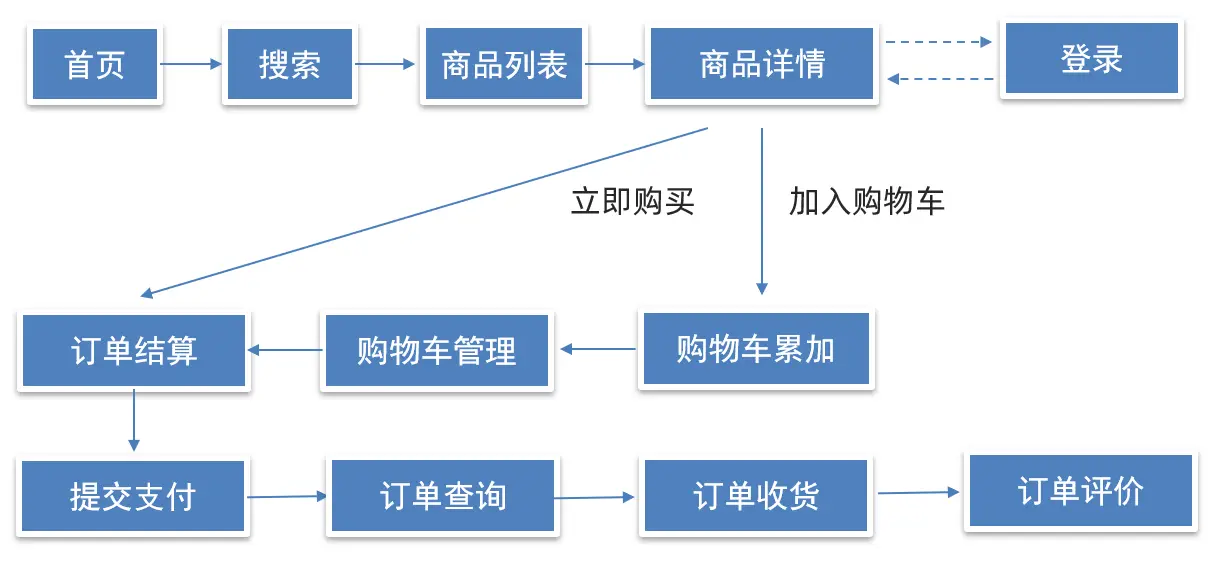
项目收获
- 完整电商购物业务流
- 组件库 vant (全部&按需导入)
- 移动端 vw 适配
- request 请求方法封装
- storage 存储模块封装
- api 请求模块封装
- 请求响应拦截器
- 嵌套路由配置
- 路由导航守卫
- 路由跳转传参
- vuex 分模块管理数据
- 项目打包&优化
项目创建及初始化
这里使用 create-vue 创建项目,并非课程里的 vue-cli 创建项目。
创建项目
使用
create-vue创建项目bash❯ pnpm create vue@legacy .../Local/pnpm/store/v3/tmp/dlx-14152 | +1 + .../Local/pnpm/store/v3/tmp/dlx-14152 | Progress: resolved 1, reused 1, downloaded 0, added 1, done Vue.js - The Progressive JavaScript Framework √ Project name: ... hm-shopping √ Add TypeScript? ... No / Yes √ Add JSX Support? ... No / Yes √ Add Vue Router for Single Page Application development? ... No / Yes √ Add Pinia for state management? ... No / Yes √ Add Vitest for Unit Testing? ... No / Yes √ Add Cypress for both Unit and End-to-End testing? ... No / Yes √ Add ESLint for code quality? ... No / Yes √ Add Prettier for code formatting? ... No / Yes Scaffolding project in C:\Users\Jaime\Desktop\code\hm-shopping... Done. Now run: cd hm-shopping pnpm install pnpm lint pnpm dev ❯ cd hm-shopping && pnpm i WARN deprecated vue@2.7.16: Vue 2 has reached EOL and is no longer actively maintained. See https://v2.vuejs.org/eol/ for more details. WARN 1 deprecated subdependencies found: sourcemap-codec@1.4.8 Packages: +160 ++++++++++++++++++++++++++++++++++++++++++++++++++++++++++++++++++++++++++++++++++++++++++++++++++++++++++++++++++++++ Progress: resolved 182, reused 158, downloaded 2, added 160, done dependencies: + vue 2.7.16 (3.4.15 is available) deprecated + vue-router 3.6.5 (4.2.5 is available) devDependencies: + @rushstack/eslint-patch 1.7.2 + @vitejs/plugin-legacy 2.3.1 (5.3.0 is available) + @vitejs/plugin-vue2 1.1.2 (2.3.1 is available) + @vue/eslint-config-prettier 7.1.0 (9.0.0 is available) + eslint 8.56.0 + eslint-plugin-vue 9.21.1 + prettier 2.8.8 (3.2.4 is available) + terser 5.27.0 + vite 3.2.8 (5.0.12 is available) Done in 3.2s手动安装 vuex3
bashpnpm add vuex@3安装 less 预处理器
bashpnpm add less less-loader -D
调整初始化目录结构
强烈建议大家严格按照老师的步骤进行调整,为了符合企业规范
为了更好的实现后面的操作,我们把整体的目录结构做一些调整。
删除初始化的一些默认文件
src/assets/*src/components/*src/views/*
修改没删除的文件
router/index.js:删除默认的路由配置App.vue:删除<router-view />路由出口以外的所有元素及样式main.js:删除引入的main.css文件
新增需要的目录结构
src/api:存储接口模块 (发送 ajax 请求接口的模块)src/utils:存储一些工具模块 (自己封装的方法)
此时的目录结构
bash❯ lsd --tree --icon-theme unicode --group-directories-first -I node_modules 📂 . ├── 📂 public │ └── 📄 favicon.ico ├── 📂 src │ ├── 📂 api │ ├── 📂 assets │ ├── 📂 components │ ├── 📂 router │ │ └── 📄 index.js │ ├── 📂 store │ │ └── 📄 index.js │ ├── 📂 utils │ ├── 📂 views │ ├── 📄 App.vue │ └── 📄 main.js ├── 📄 eslint.config.js ├── 📄 index.html ├── 📄 package.json ├── 📄 pnpm-lock.yaml └── 📄 vite.config.js
代码示例
js
import Vue from 'vue'
import VueRouter from 'vue-router'

Vue.use(VueRouter)

const routes = []

const router = new VueRouter({
  mode: 'history',
  routes,
})

export default routerjs
import Vue from 'vue'
import Vuex from 'vuex'

Vue.use(Vuex)
export default new Vuex.Store({
  modules: {},
})vue
<script setup>
</script>

<template>
  <div id="app">
    <router-view />
  </div>
</template>

<style scoped>

</style>js
import Vue from 'vue'

import App from './App.vue'
import router from './router'
import store from './store'

new Vue({
  router,
  store,
  render: h => h(App),
}).$mount('#app')vant 组件库
- 组件库:第三方封装好了很多很多的组件,整合到一起就是一个组件库。
- Vant 移动端组件库
- Vant 是一个轻量、可定制的移动端组件库,于 2017 年开源。目前 Vant 官方提供了 Vue 2 版本、Vue 3 版本和微信小程序版本,并由社区团队维护 React 版本和支付宝小程序版本。
- GitHub - youzan/vant: A lightweight, customizable Vue UI library for mobile web apps.
- 文档网站(国内)
- 文档网站(GitHub)
- Vant 3 - 轻量、可靠的移动端组件库
- Vant 2 版本基于 Vue 2,Vant 3/4 版本基于 Vue 3。
常用的组件库
- Element:饿了么团队维护的基于 Vue 2.0 的桌面端组件库。
- Element Plus:社区维护的基于 Vue 3 的桌面端组件库。
- iView - 一套高质量的 UI 组件库:TalkingData 开发的基于 Vue 2 的桌面端组件库。
- Ant Design Vue:社区维护的桌面端组件库。
- Vant 2 - 轻量、可靠的移动端组件库:有赞维护的移动端组件库。
- Mint UI:饿了么的移动端组件库。
- cube-ui:滴滴维护的移动端组件库。
安装 Vant 组件库
bash
# Vue 3 项目,安装最新版 Vant
pnpm add vant

# Vue 2 项目,安装 Vant 2
pnpm add vant@latest-v2引入 Vant 组件
全部引入和按需引入的区别
- 全部引入使用简单,但是项目打包后的体积变大,进而影响用户访问网站的性能。
- 按需引入组件的 CSS 样式,从而减少一部分代码体积,但使用起来会变得繁琐一些。
- 如果业务对 CSS 的体积要求不是特别极致,推荐使用更简便的全部引入。
全部引入
在
main.js中全局引入 vant 组件库然后全局注册。- 全局注册后,你可以在 app 下的任意子组件中使用注册的 Vant 组件。
子组件中使用 Vant 组件。
js
import Vue from 'vue'
import Vant from 'vant'
import App from './App.vue'
import router from './router'
import store from './store'
// 全局引入 Vant 组件库
// 引入 Vant 组件库样式
import 'vant/lib/index.css'
vue
<script setup>
</script>

<template>
  <div id="app">
    <router-view />
    <!-- Vant Button 按钮组件 -->
    <van-button type="primary">
      主要按钮
    </van-button>
    <van-button type="success">
      成功按钮
    </van-button>
    <van-button type="default">
      默认按钮
    </van-button>
    <van-button type="warning">
      警告按钮
    </van-button>
    <van-button type="danger">
      危险按钮
    </van-button>
  </div>
</template>

<style scoped>

</style>按需引入
注意
unplugin-vue-components 插件不支持 Vite + Vue2 的项目,需要使用 Vite + Vue3 的项目。所以这里只是演示按需引入的方式,后续步骤恢复为全部引入的方式。
安装 GitHub - unplugin/unplugin-vue-components: 📲 On-demand components auto importing for Vue 插件。
bashpnpm add -D unplugin-vue-componentsVite 中安装配置插件
ts// vite.config.ts import vue from '@vitejs/plugin-vue' import Components from 'unplugin-vue-components/vite' import { VantResolver } from 'unplugin-vue-components/resolvers' export default defineConfig({ plugins: [ ..., vue(), Components({ resolvers: [VantResolver()], }), ], })在
main.js中局部引入 vant 组件库然后全局注册。- 全局注册后,你可以在 app 下的任意子组件中使用注册的 Vant 组件。
- 如果组件很多,影响
main.js文件。可以将引入组件的步骤抽离到单独的 js 文件中比如utils/vant-ui.js,然后在main.js中进行导入。
子组件中使用 Vant 组件。
js
import Vue from 'vue'

import App from './App.vue'
import router from './router'
import store from './store'

// 引入 Vant 组件库
import '@/utils/vant-ui.js'

new Vue({
  router,
  store,
  render: h => h(App),
}).$mount('#app')vue
<script setup>
</script>

<template>
  <div id="app">
    <router-view />
    <!-- Vant Button 按钮组件 -->
    <van-button type="primary">
      主要按钮
    </van-button>
    <van-button type="success">
      成功按钮
    </van-button>
    <van-button type="default">
      默认按钮
    </van-button>
    <van-button type="warning">
      警告按钮
    </van-button>
    <van-button type="danger">
      危险按钮
    </van-button>
    <!-- Vant Icon 图标组件  -->
    <van-icon name="like-o" badge="9" />
    <van-icon name="like" badge="9" />
    <!-- Vant Dialog 弹出框组件  -->
    <van-dialog />
  </div>
</template>

<style scoped>

</style>js
import Vue from 'vue'

// 局部引入 Vant 组件库 Button/Icon/Dialog 组件
import { Button, Dialog, Icon } from 'vant'

// 注册 Vant 组件库
Vue.use(Button)
Vue.use(Icon)
Vue.use(Dialog)浏览器适配
- Vant 默认使用
px作为样式单位,如果需要使用viewport单位 (vw, vh, vmin, vmax),推荐使用 postcss-px-to-viewport 进行转换。 - postcss-px-to-viewport 是一款 PostCSS 插件,用于将 px 单位转化为 vw/vh 单位。
安装
postcss-px-to-viewport插件bashpnpm add postcss-px-to-viewport -D添加 postcss 配置
bash// postcss.config.js module.exports = { plugins: { 'postcss-px-to-viewport': { viewportWidth: 375, }, }, };
viewportWidth 设计稿的视口宽度
- vant-ui 中的组件就是按照 375 的视口宽度设计的
- 恰好面经项目中的设计稿也是按照 375 的视口宽度设计的,所以此时 我们只需要配置 375 就可以了
- 如果设计稿不是按照 375 而是按照 750 的宽度设计,那此时这个值该怎么填呢?
- 设计图 750,调成 1 倍 => 适配 375 标准屏幕
viewportWidth: 375 - 设计图 640,调成 1 倍 => 适配 320 标准屏幕
viewportWidth: 320
- 设计图 750,调成 1 倍 => 适配 375 标准屏幕
路由配置
但凡是单个页面,独立展示的,都是一级路由
路由设计:
- 登录页
login/index.vue - 首页架子
layout/index.vue- 首页 - 二级
layout/home.vue - 分类页 - 二级
layout/category.vue - 购物车 - 二级
layout/cart.vue - 我的 - 二级
layout/my.vue
- 首页 - 二级
- 搜索页
search/index.vue - 搜索列表页
searchList/index.vue - 商品详情页
goodsDetail/index.vue - 结算支付页
pay/index.vue - 我的订单页
order/index.vue
一级路由配置
- 一级路由配置在
router/index.js中配置 - 一级路由对应的组件在
views目录下创建对应的文件夹和文件views/layout/index.vueviews/login/index.vueviews/search/index.vueviews/searchList/index.vueviews/goodsDetail/index.vueviews/pay/index.vueviews/order/index.vue
- 在
App.vue中配置一级路由出口
示例代码
js
import Vue from 'vue'
import VueRouter from 'vue-router'

import LoginPage from '@/views/login/index.vue'
import LayoutPage from '@/views/layout/index.vue'
import SearchPage from '@/views/search/index.vue'
import SearchListPage from '@/views/searchlist/index.vue'
import GoodsDetailPage from '@/views/goodsdetail/index.vue'
import PayPage from '@/views/pay/index.vue'
import OrderPage from '@/views/order/index.vue'

Vue.use(VueRouter)

const routes = [
  { path: '/login', name: 'login', component: LoginPage },
  { path: '/', name: 'layout', component: LayoutPage },
  { path: '/search', name: 'search', component: SearchPage },
  { path: '/searchlist', name: 'searchlist', component: SearchListPage },
  // 动态路由传参,确认将来是哪个商品,路由参数中携带 id
  {
    path: '/goodsdetail/:id',
    name: 'goodsdetail',
    component: GoodsDetailPage,
    props: true,
  },
  { path: '/pay', name: 'pay', component: PayPage },
  { path: '/order', name: 'order', component: OrderPage },
]

const router = new VueRouter({
  mode: 'history',
  routes,
})

export default routervue
<script>
export default {
  name: 'LayoutPage',
  data() {
    return {}
  },
}
</script>

<template>
  <div>
    layout页面
  </div>
</template>

<style lang="less" scoped>

</style>vue
<script>
export default {
  name: 'LoginPage',
  data() {
    return {}
  },
}
</script>

<template>
  <div>
    login页面
  </div>
</template>

<style lang="less" scoped>

</style>vue
<script>
export default {
  name: 'SearchPage',
  data() {
    return {}
  },
}
</script>

<template>
  <div>
    搜索页面
  </div>
</template>

<style lang="less" scoped>

</style>vue
<script>
export default {
  name: 'SearchListPage',
  data() {
    return {}
  },
}
</script>

<template>
  <div>
    搜索列表页面
  </div>
</template>

<style lang="less" scoped>

</style>vue
<script>
export default {
  name: 'GoodsDetailPage',
  data() {
    return {}
  },
}
</script>

<template>
  <div>
    商品详情页面
  </div>
</template>

<style lang="less" scoped>

</style>vue
<script>
export default {
  name: 'PayPage',
  data() {
    return {}
  },
}
</script>

<template>
  <div>
    支付页面
  </div>
</template>

<style lang="less" scoped>

</style>vue
<script>
export default {
  name: 'OrderPage',
  data() {
    return {}
  },
}
</script>

<template>
  <div>
    订单页面
  </div>
</template>

<style lang="less" scoped>

</style>vue
<script>
export default {
  name: 'App',
  data() {
    return {}
  },
}
</script>

<template>
  <div id="app">
    <router-view />
  </div>
</template>

<style scoped>

</style>js
import Vue from 'vue'

import Vant from 'vant'
import App from './App.vue'
import router from './router'
import store from './store'

// import '@/utils/vant-ui.js'
import 'vant/lib/index.css'

Vue.use(Vant)

new Vue({
  router,
  store,
  render: h => h(App),
}).$mount('#app')二级路由配置
- 二级路由在
router/index.js中配置:layout路由下配置children - 二级路由组件在
views/layout目录下创建对应的文件layout/home.vuelayout/category.vuelayout/cart.vuelayout/my.vue
- 二级路由出口在
views/layout/index.vue中配置
示例代码
js
import Vue from 'vue'
import VueRouter from 'vue-router'

import LoginPage from '@/views/login/index.vue'
import LayoutPage from '@/views/layout/index.vue'
import SearchPage from '@/views/search/index.vue'
import SearchListPage from '@/views/searchlist/index.vue'
import GoodsDetailPage from '@/views/goodsdetail/index.vue'
import PayPage from '@/views/pay/index.vue'
import OrderPage from '@/views/order/index.vue'

import HomePage from '@/views/layout/home.vue'
import CategoryPage from '@/views/layout/category.vue'
import CartPage from '@/views/layout/cart.vue'
import MyPage from '@/views/layout/my.vue'

Vue.use(VueRouter)

const routes = [
  { path: '/login', name: 'login', component: LoginPage },
  {
    path: '/',
    name: 'layout',
    component: LayoutPage,
    redirect: '/home',
    children: [
      { path: '/home', name: 'home', component: HomePage },
      { path: '/category', name: 'category', component: CategoryPage },
      { path: '/cart', name: 'cart', component: CartPage },
      { path: '/my', name: 'my', component: MyPage },
    ],
  },
  { path: '/search', name: 'search', component: SearchPage },
  { path: '/searchlist', name: 'searchlist', component: SearchListPage },
  // 动态路由传参,确认将来是哪个商品,路由参数中携带 id
  {
    path: '/goodsdetail/:id',
    name: 'goodsdetail',
    component: GoodsDetailPage,
    props: true,
  },
  { path: '/pay', name: 'pay', component: PayPage },
  { path: '/order', name: 'order', component: OrderPage },
]

const router = new VueRouter({
  mode: 'history',
  routes,
})

export default routervue
<script>
export default {
  name: 'LayoutPage',
  data() {
    return {}
  },
}
</script>

<template>
  <div>
    <!-- layout页面 -->
    <!-- 二级路由出口:二级组件展示的位置 -->
    <router-view />
  </div>
</template>

<style lang="less" scoped>

</style>vue
<script>
export default {
  name: 'HomePage',
  data() {
    return {}
  },

}
</script>

<template>
  <div>
    HomePage
  </div>
</template>

<style lang="less" scoped>

</style>vue
<script>
export default {
  name: 'CategoryPage',
  data() {
    return {}
  },
}
</script>

<template>
  <div>
    CategoryPage
  </div>
</template>

<style lang="less" scoped>

</style>vue
<script>
export default {
  name: 'CartPage',
  data() {
    return {}
  },
}
</script>

<template>
  <div>
    CartPage
  </div>
</template>

<style lang="less" scoped>

</style>vue
<script>
export default {
  name: 'MyPage',
  data() {
    return {}
  },
}
</script>

<template>
  <div>
    MyPage
  </div>
</template>

<style lang="less" scoped>

</style>Tabbar 标签栏组件
- 在
utils/vant-ui.js中引入Tabbar和TabbarItem组件 - 在
views/layout/index.vue中使用Tabbar和TabbarItem组件- 复制官方代码
- 修改显示文本及显示的图标
- 配置高亮颜色
示例代码
js
import Vue from 'vue'

import { Tabbar, TabbarItem } from 'vant'

Vue.use(Tabbar)
Vue.use(TabbarItem)vue
<script>
export default {
  name: 'LayoutPage',
  data() {
    return {}
  },
}
</script>

<template>
  <div>
    <!-- layout页面 -->
    <!-- 二级路由出口:二级组件展示的位置 -->
    <router-view />
    <van-tabbar active-color="#ee0a24" inactive-color="#000" route>
      <van-tabbar-item icon="wap-home-o" to="/home">
        首页
      </van-tabbar-item>
      <van-tabbar-item icon="apps-o" to="/category">
        分类页
      </van-tabbar-item>
      <van-tabbar-item icon="shopping-cart-o" to="/cart">
        购物车
      </van-tabbar-item>
      <van-tabbar-item icon="user-o" to="/my">
        我的
      </van-tabbar-item>
    </van-tabbar>
  </div>
</template>

<style lang="less" scoped>

</style>准备工作
- 添加公共样式和图片素材
公共样式
- 准备
styles/common.less重置默认样式 - 在
main.js中导入
less
// 重置默认样式
* {
  margin: 0;
  padding: 0;
  box-sizing: border-box;
}

// 文字溢出省略号
.text-ellipsis-2 {
  overflow: hidden;
  -webkit-line-clamp: 2;
  text-overflow: ellipsis;
  display: -webkit-box;
  -webkit-box-orient: vertical;
}js
import Vue from 'vue'
import Vant from 'vant'
import App from './App.vue'
import router from './router'
import store from './store'

import '@/styles/common.less'

// import '@/utils/vant-ui.js'
import 'vant/lib/index.css'

Vue.config.productionTip = false

Vue.use(Vant)

new Vue({
  router,
  store,
  render: h => h(App),
}).$mount('#app')图片素材
src目录下的assets目录存放静态资源,比如图片、字体等- 将准备好的一些图片素材拷贝到
src/assets目录【备用】
src 目录结构
bash
❯ lsd --tree --icon-theme unicode --group-directories-first ./src
📂 src
├── 📂 api
├── 📂 assets
│   ├── 📄 banner1.jpg
│   ├── 📄 banner2.jpg
│   ├── 📄 banner3.jpg
│   ├── 📄 border-line.png
│   ├── 📄 categood.png
│   ├── 📄 code.png
│   ├── 📄 default-avatar.png
│   ├── 📄 empty.png
│   ├── 📄 main.png
│   ├── 📄 nav1.png
│   └── 📄 product.jpg
├── 📂 components
├── 📂 router
│   └── 📄 index.js
├── 📂 store
│   └── 📄 index.js
├── 📂 styles
│   └── 📄 common.less
├── 📂 utils
│   └── 📄 vant-ui.js
├── 📂 views
│   ├── 📂 goodsdetail
│   │   └── 📄 index.vue
│   ├── 📂 layout
│   │   ├── 📄 cart.vue
│   │   ├── 📄 category.vue
│   │   ├── 📄 home.vue
│   │   ├── 📄 index.vue
│   │   └── 📄 my.vue
│   ├── 📂 login
│   │   └── 📄 index.vue
│   ├── 📂 order
│   │   └── 📄 index.vue
│   ├── 📂 pay
│   │   └── 📄 index.vue
│   ├── 📂 search
│   │   └── 📄 index.vue
│   └── 📂 searchlist
│       └── 📄 index.vue
├── 📄 App.vue
└── 📄 main.js